Best EMF Meters for Home Testing (2026): Honest Reviews from Someone Who Actually Uses Them

I own two of the best EMF meters on this list and use them regularly in my own home. Once I started measuring EMF around my house, I got pretty particular about which tools actually give you useful information and which ones leave you with blind spots. Everything below is based on personal testing where I have it, and honest research where I don’t.

Affiliate disclosure: Some links here are affiliate links. If you buy through them I may earn a small commission at no extra cost to you.

Quick Picks

  1. Trifield TF2 — Best all-around meter for most people. Measures all three EMF types. My daily driver.
  2. GQ EMF-390 — Best for data logging and spectrum analysis. My second meter for deeper dives.
  3. Safe and Sound Pro II — Best RF-only meter. Third-party certified accuracy. Trusted by professionals.
  4. ERICKHILL RT-100S (3-in-1) — Best budget pick that covers all three field types.
  5. ERICKHILL Basic — Magnetic and electric only. Read my note before buying this one.

1. Trifield TF2

My Personal Pick — The best all-around meter for most people

The Trifield TF2 is the meter I reach for most often. It measures all three EMF types, it’s easy to use, and the readings make sense without needing an engineering degree. I’ve used mine to walk through every room in my house, test appliances, check around my JRS Eco router, and measure the field around my laptop.

What I like most is the 3-axis magnetic field sensor. Most budget meters only measure in one direction, which means you have to rotate the meter around to find the peak reading. The TF2 picks up magnetic fields from all three axes simultaneously, so you get an accurate reading no matter how you’re holding it.

The RF mode covers 20 MHz all the way up to 6 GHz, which handles Wi-Fi (both 2.4 and 5 GHz bands), cell phone signals, smart meters, and Bluetooth. Use peak mode when testing anything wireless. RF from digital devices comes in pulses, and if you just watch the average reading, you’ll miss the spikes.

One honest limitation: the RF accuracy is rated at plus or minus 20 percent at 1 GHz. That sounds rough, but for home testing purposes it’s fine. You’re generally trying to understand whether a source is low, moderate, or high, not publish research-grade data.

SpecDetail
Magnetic field range0.1 to 100.0 mG (40 Hz to 100 kHz)
Electric field range1 to 1000 V/m (40 Hz to 100 kHz)
RF range0.001 to 19.999 mW/m² (20 MHz to 6 GHz)
Magnetic axis3-axis (true simultaneous)
Battery9V alkaline, 20+ hours (backlight off)
Special featuresWeighted mode, peak hold, audio indicator, backlight

What I like

  • True 3-axis magnetic sensing
  • Covers all three EMF types in one unit
  • Intuitive dial-based controls
  • Peak hold essential for pulsed RF
  • Long battery life

Worth knowing

  • RF accuracy is ±20% (fine for home use, not lab-grade)
  • No data logging
  • Higher price than budget options
  • RF is 1-axis (rotate meter when testing wireless sources)

My take: This is the meter I’d buy again without hesitation. If you only buy one meter, this is the one. It does everything well enough for real home testing, and the ease of use means you’ll actually pick it up and use it regularly.

Check price on Amazon

2. GQ EMF-390

My Personal Pick — For data loggers, spectrum watchers, and detail-oriented testers

The GQ EMF-390 is the second meter I added to my collection, and it fills a different role than the TF2. Where the Trifield is simple and intuitive, the GQ is information-dense and feature-rich. It’s not the meter I grab for a quick sweep of a room, but it’s the one I use when I want to track readings over time or dig into the RF spectrum.

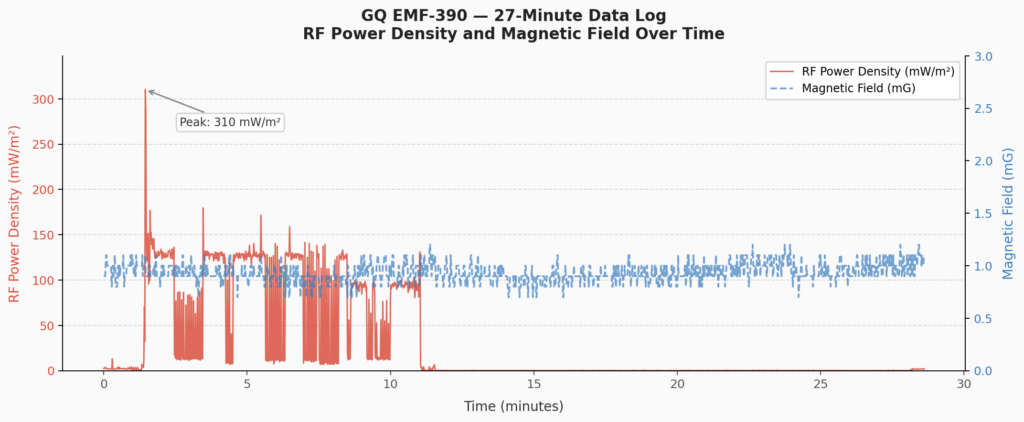
The built-in data logging is what makes it genuinely unique at this price point. The meter stores real-time readings every second with timestamps to 1MB of internal flash memory. You connect it to a PC via USB, download the data with the free EMF-Pro software, and look back at what your environment was doing while you were asleep or away. I used this to monitor RF levels in my bedroom overnight. It’s a completely different kind of insight than a spot reading.

The RF browser displays a visual graph of RF signals over the past 45 seconds, which helps you see whether signals are pulsed or more continuous. The built-in spectrum analyzer lets you identify what frequency a signal is coming from, which is useful when you’re trying to figure out which device is responsible for a reading.

The main trade-off is usability. The display is functional but cramped, and navigating the settings takes some getting used to. I wouldn’t hand this to someone who just wants to walk around their house and get quick readings. But if you want to actually understand your data, this meter rewards patience.

SpecDetail
Magnetic field range0 to 500 mG
Electric field range0 to 1000 V/m
RF range0.02 to 9999 mW/m² (up to 10 GHz)
Data loggingYes, 1MB internal flash, PC download via USB
Special featuresRF spectrum analyzer, RF browser, simultaneous display, rechargeable
Made inUSA (GQ Electronics, Seattle WA)

What I like

  • Built-in data logging with PC software
  • RF spectrum analyzer (unique at this price)
  • Broader RF range up to 10 GHz
  • Rechargeable via USB
  • Simultaneous display of all three field types
  • USA-based company with good support

Worth knowing

  • Steeper learning curve than the TF2
  • Display is functional but not pretty
  • Some mixed user reports on magnetic field accuracy
  • Requires time investment to get the most from it

My take: This is my second meter, not my first, and that’s exactly how I’d recommend using it. Get comfortable with the TF2, then add the GQ when you want to go deeper. If data logging or spectrum analysis sounds exciting to you, it’s worth every penny.

Check price on Amazon

3. Safe and Sound Pro II

RF Specialist — The most accurate RF meter on this list, but RF only

I want to be transparent: I haven’t personally used the Safe and Sound Pro II. Everything below is based on published specs, independent testing reports, and the consistent recommendations of building biologists and EMF consultants who use it in professional assessments. I’d weigh their experience heavily here. This community tends to be more rigorous about meter accuracy than most.

It’s third-party certified by Nemko Canada, individually calibrated, and covers 200 MHz to 8 GHz with true response detection between 400 MHz and 7.2 GHz at plus or minus 6 dB. EMF engineers and building biologists regularly recommend it as the minimum standard for professional home testing.

The audio function is more useful than it sounds on paper. A pulsed digital signal like a smart meter transmitting produces a rhythmic clicking pattern. Continuous wave signals sound different. Wi-Fi has its own recognizable signature.

Once you learn those patterns, you are not just reading numbers on a screen. You are developing an ear for your environment. Building biologists who write about this meter regularly mention the audio as something that genuinely changes how they approach a testing session.

The big limitation is obvious: it only measures RF. If you want a complete picture of your home, you’d need to pair it with a magnetic field meter. That’s why I’d still recommend the TF2 first for most people. But if RF is your primary concern and you want the most reliable readings possible, the Safe and Sound Pro II is the right tool.

SpecDetail
MeasuresRF only (no magnetic or electric)
RF range200 MHz to 8 GHz
Sensitivity0.001 µW/m² (extremely sensitive)
Certification3rd-party lab certified (Nemko Canada)
DisplayOLED, peak/max/average readings
Battery2x AA alkaline, 12 to 15 hours

What I like

  • 3rd-party certified accuracy
  • Extremely high sensitivity (useful for EHS individuals)
  • Audio function helps identify RF sources
  • Clean OLED display with multiple reading modes
  • Widely trusted by professionals

Worth knowing

  • RF only: no magnetic or electric field measurement
  • Higher price than budget alternatives
  • You’ll need a second meter to cover all EMF types

Where this meter earns its price is in specific situations. If you are an EHS individual trying to identify particular RF triggers, if you are doing before and after measurements around shielding work, or if you simply need to trust the number on the screen rather than treat it as approximate, this is the meter built for that kind of work.

My take: Based on my research, this is the most credible RF meter at this price point. I haven’t tested it personally, but I’ve read enough independent reviews and professional recommendations to feel confident saying: if RF accuracy is your top priority, this is the one to buy.

Check price on Amazon

4. ERICKHILL ER02 (3-in-1)

Budget Pick — A capable 3-in-1 at a reasonable price

I haven’t tested the ERICKHILL ER02 myself, but the specs here are more impressive than you’d expect at this price point. Unlike most budget meters that skip RF or cap it at a low frequency, the ER02 measures all three field types and claims RF detection up to 10 GHz, which would cover most 5G signals you’re likely to encounter at home.

The dual interface is a nice touch. You get both a standard digital readout and a graph view on the same screen, which makes it easier to see how readings change over time as you move around a space. The color-coded backlit display shifts from green to orange to red as levels rise, so you get an immediate visual read without having to interpret numbers.

It sits in an interesting middle ground price-wise. More capable on paper than most budget meters, but still well below the Trifield TF2 in terms of build quality and verified accuracy. The RF detection up to 10 GHz is a bold claim at this price, and I haven’t been able to verify it independently with my own meters. Take the RF range spec with some caution until I can test it directly.

SpecDetail
MeasuresMagnetic, Electric, RF (all three)
RF rangeUp to 10 GHz (per manufacturer)
DisplayDual interface: digital readout and graph view
ScreenColor-coded backlight: green, orange, red
BatteryRechargeable, built-in
Warranty36 months

What I like

  • All three EMF types including RF
  • RF range claim of 10 GHz is strong for the price
  • Dual display interface is genuinely useful
  • Color-coded screen makes readings easy to interpret
  • Rechargeable, no disposable batteries

Worth knowing

  • RF range claim is manufacturer-stated, not independently verified at this price
  • Less proven accuracy than the TF2
  • Newer model with a smaller review base than the RT-100

My take: Based on the specs, this is a reasonable option if you want all three field types and the TF2 is out of your budget. The 10 GHz RF claim is promising but I’d treat the readings as directional rather than precise until I can test it myself. I’ll update this once I’ve had a chance to run it against my own meters.

Check price on Amazon

5.5. ERICKHILL RT-100 (Magnetic and Electric Only)

Heads Up — Worth reconsidering: this one skips RF entirely

The ERICKHILL RT-100 is fine for what it does, but it has a significant gap that I think most people don’t notice when they’re buying it: it does not measure RF at all. The Amazon listing even notes this in parentheses, “RF Not Included,” though it’s easy to miss.

The spec sheets confirm it: this meter reads magnetic fields in mG and electric fields in V/m, and that’s it. If you hold it near your Wi-Fi router, it will show you nothing useful about the RF signal coming from that router. Same for your phone, your smart meter, your Bluetooth speaker. Those are RF sources, and this meter is blind to them.

For what it does, the readings are consistent and easy to read. If all you want is a basic check of low-frequency fields near appliances and wiring, it gets that job done. But for most people getting into EMF awareness, understanding wireless device exposure is a big part of what they want to know, and this meter can’t help with that. The ER02 above adds RF for a modest price difference, and that’s worth it.

SpecDetail
MeasuresMagnetic and electric fields only
RF measurementNone
Magnetic range0 to 100 mG
Electric range0 to 1000 V/m
Auto power off5 minutes
BatteryRechargeable, USB

Where it works

  • Inexpensive and easy to use
  • Consistent readings for low-frequency fields
  • Rechargeable battery
  • Fine for a basic appliance check

Worth knowing

  • No RF measurement at all
  • Blind to Wi-Fi, cell phones, smart meters, Bluetooth
  • The ER02 above adds RF for a modest price difference
  • Auto power off at 5 minutes can be frustrating during longer tests

My take: I’d suggest reconsidering this one for most people. Not because it’s bad at what it does, but because skipping RF leaves too big a blind spot. If your budget only stretches this far, this gives you something. But if you can spend a little more, the ER02 covers all three field types and is the smarter buy.

Check price on Amazon

Which Meter Should You Buy?

Here’s how I’d think about it depending on where you’re starting from.

If you want one solid all-around meter: Get the Trifield TF2. It measures all three EMF types, it’s straightforward to use, and the 3-axis magnetic sensor alone makes it worth the price over budget alternatives. This is what I use for most of my home testing.

If you’re on a tight budget but still want RF coverage: The ERICKHILL ER02 is the best option in that range. The manufacturer claims RF detection up to 10 GHz, which is strong for the price. I haven’t verified that independently yet, but as a starting point it covers more ground than most budget meters.

If RF accuracy is your top priority: The Safe and Sound Pro II is the most credibly accurate RF meter on this list. Pair it with the TF2 or another magnetic field meter to cover your bases.

If you want to log data over time and dig into spectrum analysis: The GQ EMF-390 is genuinely unique at its price point. I use it alongside my TF2, not instead of it.

If you’re looking at the basic ERICKHILL RT-100 with no RF: I’d encourage you to step up to the ER02 or the TF2. Skipping RF leaves too big a gap for most people’s needs.

What to Look for in the Best EMF Meter

If you’re new to this, it helps to understand that EMF isn’t one thing. It covers three distinct types of fields that require different sensors to detect.

Magnetic fields (ELF/LF) come from electrical current flowing through wires and appliances. Measured in milligauss (mG). Your fridge, your electrical panel, and the wiring inside your walls all produce these.

Electric fields (EF) exist anywhere there’s voltage, even in an unplugged lamp cord that’s still connected to the wall. Measured in volts per meter (V/m). These are easy to reduce simply by unplugging things you’re not using.

Radio frequency (RF) is the high-frequency stuff: Wi-Fi, cell phone signals, smart meters, Bluetooth. Measured in microwatts per square meter (µW/m²). This is what most people are most concerned about, and it’s the field type that requires the most capable sensor to measure well.

A meter that skips RF leaves a major blind spot. Several popular budget meters quietly omit it, and I’ve flagged each one clearly in the reviews above.

Frequently Asked Questions

Here are answers to the questions I hear most often from people who are just getting started with EMF testing.

Can a smartphone app replace a dedicated EMF meter?

No, not reliably. Most phones have a magnetometer for the compass function, and some apps tap into it to display magnetic field readings. But the sensor isn’t designed or calibrated for EMF measurement, the readings are inconsistent, and phones have no hardware to detect electric fields or RF radiation at all. I wrote a full breakdown of what phone apps can and can’t actually measure if you want the details.

Do EMF meters pick up Wi-Fi signals?

Most do. A combo meter like the Trifield TF2 detects RF from routers operating at 2.4 GHz and 5 GHz, which covers the majority of home networks. Where meters differ is in how sensitive they are and how accurately they read across the full frequency range. If Wi-Fi is your primary concern, RF sensitivity and frequency range are the specs to look at closely before buying.

Where should I start when testing EMF levels in my home?

Start with the places where you spend the most time, particularly your bedroom. Test at body height, move slowly, and pause near the bed and any wall that might have wiring or a router on the other side. Taking readings before and after a change, like moving a router or unplugging a device, is how you confirm whether it made a measurable difference. For a full room by room walkthrough with real readings, how to test EMF levels in your home covers every source worth checking and what to do with what you find.

What’s a normal reading on an EMF meter?

Here are the precautionary guidelines most building biologists use as a reference:

  • Magnetic fields: below 1 mG in sleeping areas
  • Electric fields: below 10 V/m in sleeping areas
  • RF: below 10 µW/m² for sensitive individuals, below 100 µW/m² as a general precaution

These aren’t regulatory limits. They’re conservative benchmarks based on the precautionary principle. I’ve written a full breakdown of what normal EMF meter readings actually look like across all three field types if you want to go deeper. Regulatory limits from bodies like ICNIRP are orders of magnitude higher, and where you land on that spectrum is a personal decision.

Can a cheap EMF meter give accurate readings?

For a rough sense of high vs. low, yes. For anything more precise, like confirming whether shielding is working or comparing before and after a change, you want a calibrated meter. Budget meters often have poor frequency response, meaning they’ll under-read or miss signals in certain bands entirely. The ERICKHILL ER02’s limited 5 GHz detection is a good example of this. For a full breakdown of where budget meters fall short, read cheap electromagnetic field meter accuracy.

Do I need more than one EMF meter?

Most people don’t, especially starting out. A good all-in-one meter like the TF2 covers the full range of field types you’ll encounter at home. Where a second meter makes sense is if you want higher RF accuracy alongside your whole-home meter. That’s why I eventually added the GQ EMF-390, not to replace the TF2, but to go deeper when I wanted more detailed RF data.

Will an EMF meter detect 5G?

Probably, for most real-world 5G. Most current US deployments use sub-6 GHz frequencies, which all three serious meters on this list cover. The exception is millimeter wave 5G at 24 GHz and above, which requires specialized equipment and is only deployed in very specific dense urban areas. Most people will never encounter it at measurable levels indoors.

How do I know if my meter is accurate?

Run a few sanity checks. Hold it near a running hair dryer or microwave and confirm you get a magnetic field reading. Switch to RF mode near your Wi-Fi router and confirm a signal registers. If either of those fails, something is wrong. Beyond that, most consumer meters are not independently calibrated. The Safe and Sound Pro II is the only one on this list that is, which is a meaningful differentiator if accuracy matters to you.

What frequency range should an EMF meter cover?

For home use, you want coverage from around 50 MHz up to at least 6 GHz. That range captures Wi-Fi at 2.4 and 5 GHz, Bluetooth, cell signals, and smart meter transmissions. Meters that top out at 3.5 GHz will miss 5 GHz Wi-Fi entirely, which is increasingly common in modern homes. Always check the stated frequency range in the specs before buying, not just the field types the meter claims to cover.

What’s the difference between an EMF meter and a Gaussmeter?

A Gaussmeter measures magnetic fields only, typically in milligauss or tesla. An EMF meter is a broader term that usually refers to a multi-field device covering magnetic, electric, and RF. If someone recommends a Gaussmeter for home EMF testing, they’re only giving you one third of the picture. For whole-home awareness you want a meter that covers all three field types.

Next step: Once you have a meter, check out my room-by-room home EMF testing guide to learn where to measure, what readings to expect, and which sources are typically highest in a normal home.

Disclaimer: I am not a doctor, engineer, or certified building biologist. Nothing on this site is medical advice. EMF research is ongoing and the science continues to evolve. The meters on this list are consumer tools suitable for home testing and general awareness. For professional assessment of your home or workplace, consider working with a certified building biologist. Affiliate links noted above. I earn a small commission on purchases at no cost to you.

Leave a Comment

How to Choose the Best EMF Meter

Choosing an EMF meter is more confusing than it needs to be.

There are dozens of models out there, ranging from $30 to $500+, all claiming to give you accurate readings. Some measure everything. Others only work for specific types of EMF. And the marketing language on most of them tells you very little about whether the thing will actually be useful in your home.

When I first started testing, I didn’t fully understand what I needed. I bought my first meter based on price and Amazon reviews, and it got me started, but it took a while before I understood which specs actually matter and which ones are just noise.

This guide is what I wish I’d had before I bought anything. I’ll walk you through the key decisions, explain what the specs mean in plain language, and help you figure out what kind of meter actually fits your situation. For specific product recommendations based on these criteria, EMF Protection Pros covers the recommended EMF meter to buy depending on what you’re measuring and your budget.

If you’d like to see how specific meters performed in real home testing, here’s our best EMF meters roundup.

Start Here: What Do You Actually Want to Measure?

This is the question most people skip, and it’s the most important one.

EMF is not one thing. It’s a broad term that covers several different types of fields, and different meters measure different things. If you buy the wrong type for what you’re trying to test, you’ll get either useless readings or nothing at all.

Here’s a quick breakdown of what’s out there.

Magnetic and electric fields come from the electrical wiring in your walls, appliances, power lines, and anything plugged into an outlet. These are sometimes called ELF fields, for extremely low frequency. If you want to test your electrical panel, your bedroom wiring, your refrigerator, or a lamp cord, this is what you need to measure.

Radio frequency (RF) comes from wireless devices. Your Wi-Fi router, your cell phone, Bluetooth speakers, smart meters, and cell towers all emit RF. This is a completely different type of field, and many basic meters don’t measure it at all.

Combo meters try to do both. They cover magnetic fields, electric fields, and RF in one device. The Trifield TF2, which is the meter I use most often, is a combo meter. So is the GQ EMF-390, which I use when I want to track readings over time or look at specific frequency ranges in more detail.

Figure out which category fits your concern and that alone will narrow the field significantly.

The Features That Actually Make a Difference

Once you know what type of meter you need, here’s what to pay attention to when comparing models.

Single-Axis vs. Tri-Axis

This one matters more than most people realize.

A single-axis meter has one sensor. It only picks up fields coming from one direction at a time, which means you have to slowly rotate the device to find the orientation that gives you the highest reading. It works, but it’s slow and easy to miss things.

A tri-axis meter has three sensors arranged at right angles to each other. It measures in all three directions at once and gives you the combined total automatically. No rotating required.

The price difference is usually somewhere in the $50 to $100 range. For anything beyond a one-time test, tri-axis is worth it. I use tri-axis meters for everything.

Frequency Range for RF Meters

If you’re shopping for an RF meter, the frequency range listed in the specs is one of the most important things to check.

Different wireless technologies operate at different frequencies. Standard Wi-Fi runs at 2.4 GHz and 5 GHz. Bluetooth is in a similar range. Many 5G signals push well above that, sometimes above 10 GHz depending on the band.

If your meter’s range tops out at 3 GHz, it won’t pick up anything above that. For most home testing, a range up to 8 GHz covers the majority of what you’ll encounter. If you’re specifically concerned about higher-frequency 5G bands, you’ll need something that goes further.

Always check the spec sheet, not just the marketing copy.

Display and Usability

You’re going to be walking around your home, checking readings in corners, closets, and places without great lighting. A meter with a small, dim, hard-to-read display gets frustrating quickly.

Look for a backlit digital display with numbers large enough to read at arm’s length. Some meters also include a bar graph or a color-coded LED strip (green, yellow, red) that gives you a fast visual read without having to focus on exact numbers. I find that genuinely useful when I’m scanning a room quickly.

Audio feedback is another thing I didn’t think I’d care about until I used it. A meter that beeps faster as readings increase lets you walk slowly through a room while looking at the space rather than the screen. It’s a small thing that makes testing a lot more practical.

Accuracy

Consumer meters typically have an accuracy margin of around 3 to 10 percent. For home use, that’s fine. You’re looking for relative differences between locations and sources, not laboratory-grade precision.

The meters that get down into the 1 to 2 percent range are professional instruments that cost $500 or more. Unless you’re doing this professionally or have a very specific technical need, that level of precision isn’t necessary.

Consistent, repeatable readings matter more than chasing perfect accuracy.

Build Quality and Battery Life

A meter that feels flimsy usually is. Read reviews that mention long-term durability, not just first impressions. Check whether a protective case is included or available.

Battery life varies a lot across models. Some meters run for 40 or 50 hours on a single set of batteries. Others die after 10. If you’re doing a thorough room-by-room test of your home, a short battery life becomes genuinely inconvenient. Check the spec before you buy.

Understanding the Different Types of Meters

Here’s a more detailed breakdown of the main categories.

ELF Meters

These measure low-frequency magnetic and electric fields from household wiring and appliances. Readings are displayed in milligauss (mG) or microtesla (µT), which are just two different units for the same thing. In the US, mG is the more common unit.

ELF meters are what you’d use to test your electrical panel, check the fields around your refrigerator, measure an electric blanket, or investigate wiring in a bedroom wall. They’re usually the most affordable type, with solid options available in the $50 to $100 range.

One thing to know: ELF meters do not measure RF from Wi-Fi or cell phones. If that’s what you’re after, you need an RF meter or a combo.

RF Meters

These detect wireless signals from routers, phones, smart meters, cell towers, and other wireless sources. The key spec to check is frequency range, as I mentioned above.

A good RF-only meter like the Safe and Sound Pro II tends to have better sensitivity for wireless signals than a combo meter at the same price point. If RF is your primary concern and you already have something for ELF, a dedicated RF meter is worth considering. That’s actually how I use mine. The Trifield handles day-to-day testing and I reach for the GQ EMF-390 when I want more detailed RF data.

Safe and Sound Pro II(1)

Combo Meters

Combo meters cover magnetic fields, electric fields, and RF in one device. They’re convenient and usually the right starting point for someone who wants to understand their home environment across all three types.

The tradeoff is that a combo meter at a given price point will generally be a bit less sensitive than a dedicated meter at the same price. For most home testing purposes, that difference is not significant. But if you’re specifically trying to detect weak RF from a distant cell tower, a dedicated RF meter will outperform a combo at the same price.

For beginners, I’d start with a quality combo meter. You can always add a specialized meter later if you identify a specific need.

Professional Meters

Building biologists and EMF consultants use meters that run $300 to $2,000 or more. They offer higher accuracy, wider frequency ranges, better sensitivity, and features like calibration options and detailed data logging.

For home testing, you don’t need this level of equipment. The meters in the $100 to $200 range will give you everything you need to understand your space and make informed decisions.

What You Probably Don’t Need

A few features show up in marketing copy that sound useful but rarely are in practice.

Data logging sounds helpful. In reality, most people test a spot once, note the reading, and move on. I use the data logging on my GQ EMF-390 for specific long-term observations, but it’s not something I use on every test session.

gq 390 emf meter data logging

Multiple unit display modes let you switch between mG, µT, V/m, and so on. Useful to understand once. In practice, you’ll pick one unit and stick with it.

PC connectivity and graphing software exist on some meters. Again, useful for specific research purposes, but most home users will never set it up.

Don’t pay a premium for features that won’t fit into how you actually use the meter.

Price Ranges and What to Expect

Under $50: Basic single-axis meters with limited features. These can give you a rough sense of what’s happening but expect compromises in sensitivity, accuracy, and usability. Fine for casual curiosity, but not what I’d recommend if you’re planning to do a real home assessment.

$80 to $150: Where most people should start. You can find reliable tri-axis combo meters with good accuracy and usable displays in this range. The Trifield TF2 sits here and it’s what I point beginners toward.

$150 to $250: Quality combo meters and strong dedicated RF meters. Better sensitivity, wider frequency ranges, more durable builds. Worth spending here if you have a specific concern or want more detailed RF data.

$300 and above: Professional territory. Only worth it if you’re doing this work professionally or have a very specific technical requirement.

What to Watch for When Reading Reviews

Not all reviews give you useful information. Here’s what I pay attention to.

Look for reviews from people who used the meter over several weeks or months, not just out of the box. Long-term performance is what matters.

Look for use cases similar to yours. If you’re trying to measure Wi-Fi at 5 GHz, prioritize feedback from people who actually tested that.

Pay attention to patterns in the complaints. One person mentioning a dim display might just be their preference. Ten people saying the same thing is a design issue.

Be skeptical of generic five-star reviews that don’t say anything specific. They don’t tell you how the meter actually performs.

Common Mistakes Worth Avoiding

Buying on price alone tends to lead to a second purchase. A cheap meter that doesn’t measure what you need isn’t a bargain.

Skipping the frequency range specs on RF meters is probably the most common mistake I see. If the range doesn’t cover what you’re trying to test, it doesn’t matter what else the meter does.

Buying more features than you’ll actually use is also common. More buttons and modes don’t make a meter more accurate. Simple and reliable is usually the better call.

Not accounting for distance when interpreting readings is worth mentioning here too. A reading of 50 mG right next to your microwave during a 90-second heating cycle is very different from a reading of 5 mG in the spot where you sleep every night. Context matters as much as the number.

How to Make the Decision

Start by figuring out what you actually want to measure. That one decision narrows the field more than anything else.

Set a realistic budget. For most people, $100 to $200 gets you a meter that will do everything you need for home testing without unnecessary complexity.

Prioritize tri-axis detection, an appropriate frequency range for your sources, a readable backlit display, and solid construction. Those are the things that will matter every time you use it.

Read detailed reviews from people who used the meter for actual testing, not just unboxing.

Once you know what you’re looking for, the choice becomes a lot clearer. You don’t need to test everything or spend a lot to get useful information about your home. You just need the right tool for what you’re actually trying to understand.

I’m not a doctor or an engineer, and nothing on this site is medical advice. EMF research is still evolving, and I aim to share what the current evidence suggests rather than draw conclusions the science hasn’t reached yet.

Leave a Comment

Best RF Meters: 4 That Are Actually Worth Buying

If you’ve decided you want a dedicated RF meter rather than an all-in-one EMF meter, you’re asking the right question. A purpose-built RF meter gives you better sensitivity and more confidence in low-level readings than most EMF meters can match. The tradeoff is that it only measures radio frequency radiation, so you’ll need a separate device for magnetic and electric fields.

If you want to measure magnetic and electric fields alongside RF in a single device, the Trifield TF2 is what I use and recommend.

Affiliate disclosure: Some links here are affiliate links. If you buy through them I may earn a small commission at no extra cost to you.

These are the four RF meters I recommend to anyone serious about understanding their RF environment.

  1. Safe and Sound Pro II
  2. Gigahertz Solutions HF35C
  3. Safe and Sound Classic III
  4. LATNEX HF-B3G

1. Safe and Sound Pro II

The Safe and Sound Pro II is the model I point most people toward when they’ve decided they want a dedicated RF device. It covers 200 MHz to 8 GHz across the full RF spectrum, which captures virtually everything you’ll encounter in a modern home. That includes Wi-Fi on both the 2.4 and 5 GHz bands, cell phones, cell towers, smart meters, Bluetooth, and current 5G deployments.

It’s been third-party tested and certified by Nemko Canada, which is one of the things that separates it from most portable handheld meters in this price range. You’re not just taking the manufacturer’s word for the accuracy.

The display is one of the clearest I’ve used. It shows peak, max hold, and average readings simultaneously in µW/m², with a color-coded LED bar that gives you an instant visual read on EMF levels without having to interpret numbers.

The audio function is genuinely useful once you spend a little time with it. Different RF sources produce different sound patterns, and after a while you start to recognize Wi-Fi pulses versus a smart meter versus a cell signal without even looking at the screen.

shows peak, max hold, and average readings simultaneously with color coded leds

It’s a single-axis meter, which means you need to rotate it slowly to find the direction of the strongest signal. That’s standard for this class of meter but takes a few minutes to get used to.

What I like

  • Third-party certified accuracy, not just manufacturer claims
  • Covers the full RF spectrum from 200 MHz to 8 GHz including 5 GHz Wi-Fi and current 5G
  • Clean display showing peak, max hold, and average simultaneously
  • Audio function helps identify sources by sound pattern
  • Sensitive down to 0.001 µW/m², useful for finding low-level sources
  • USB power jack for continuous monitoring without draining batteries

Worth knowing

  • Single-axis antenna requires you to rotate the meter to find peak signal direction
  • RF radiation only, no magnetic or electric field measurement

My take: This is the one I’d buy if I were starting over with a RF meter. It’s accurate, easy to read, and backed by independent testing. For most people doing serious home testing, nothing else at this price point comes close.

Check price on Amazon

2. Gigahertz Solutions HF35C

The Gigahertz Solutions HF35C is the meter building biologists have been recommending for years, and the reputation is earned. It’s made in Germany to Bau-Biologie measurement standards and is one of the most trusted options for professional RF assessment. The directional logarithmic-periodic antenna is genuinely useful for pinpointing where a signal is coming from.

When I’m trying to identify a specific source in a room rather than just get a general reading, the directional capability of this meter is hard to beat. Point it around the room and the readings climb as you face the source.

It also detects both analog and digital signals, which matters if you’re in an area with older analog RF infrastructure alongside modern digital technology.

There’s one limitation you need to know going in. The HF35C covers 800 MHz to 2.7 GHz, which does not include 5 GHz Wi-Fi. If your home has a modern router running primarily on the 5 GHz band, this meter will miss a significant part of your wireless electromagnetic fields environment.

The antenna also deserves a mention. It attaches via a small cable and connector that feels fiddly compared to the clean built-in antennas on the other meters on this list. The manual actually warns against overtightening it, and I’ve seen the connector damaged from exactly that.

What I like

  • Exceptional accuracy, trusted by building biologists worldwide
  • Directional antenna makes source detection and identification straightforward
  • Detects both analog and digital signals
  • Fine and coarse measurement ranges for both low and high level environments
  • Audio function for signal identification
  • Made in Germany with strict calibration standards

Worth knowing

  • Frequency range of 800 MHz to 2.7 GHz misses 5 GHz Wi-Fi entirely
  • External antenna connection feels fragile and requires careful handling
  • No max hold function

My take: If pinpointing RF sources with precision is your priority and your main concern is cell tower exposure rather than Wi-Fi, the HF35C is excellent. Just go in knowing the frequency ceiling is a real limitation in a world where 5 GHz Wi-Fi is everywhere.

Check price on Amazon

3. Safe and Sound Classic III

The Safe and Sound Classic III is the simplified version of the Pro II. Same frequency spectrum coverage of 200 MHz to 8 GHz, same audio function, and the same general approach to measurement. What it doesn’t have is a numerical display.

You get LED bars showing relative signal strength, but no actual µW/m² figures on screen. For some users that’s completely fine. If your goal is to identify RF hotspots, figure out where to move your router, or check whether a shielding product is having any effect, the LED display tells you what you need to know.

Where it falls short is precision. If you want to know whether a spot measures 2 µW/m² or 20 µW/m², the Classic III can’t tell you that. For tracking readings over time or comparing against specific reference thresholds, the lack of numbers is a real limitation.

What I like

  • Same 200 MHz to 8 GHz frequency range as the Pro II
  • Audio function for source identification
  • Simplest to operate of any meter on this list
  • Lower price point than the Pro II

Worth knowing

  • No numerical display, LED bars only
  • Can’t track or compare specific readings over time
  • Less useful for shielding verification where precise before and after numbers matter
  • RF radiation only, no magnetic or electric field measurement

My take: A solid starting point if the Pro II is out of budget and you primarily want to identify high RF areas rather than measure them precisely. If there’s any chance you’ll want real numbers down the road, spend the extra money on the Pro II now.

Check price on Amazon

4. LATNEX HF-B3G

The LATNEX HF-B3G is the most accessible entry point on this list. It measures RF radiation from 50 MHz to 3.5 GHz, gives you numerical readings in µW/m², and has a triple-axis sensor that captures signals from all directions simultaneously without needing to rotate the meter.

That triple-axis design is worth highlighting. Most handheld portable RF detectors at this price are single-axis, meaning you have to sweep the meter in different orientations to find the peak signal. The HF-B3G handles that automatically, which makes testing faster and more repeatable for someone just learning the process.

The honest limitation is the 3.5 GHz frequency ceiling. It will catch most of what you’ll encounter in a typical home, but it will miss 5 GHz Wi-Fi, which is increasingly the dominant band in newer routers. If your router spends most of its time on 5 GHz, you’re only getting part of the picture.

What I like

  • Triple-axis sensor captures all directions without rotating the meter
  • Numerical display in µW/m²
  • Covers 50 MHz to 3.5 GHz for most common RF sources
  • More accessible price point than the rest of this list

Worth knowing

  • Frequency ceiling of 3.5 GHz misses 5 GHz Wi-Fi
  • Less commonly used by practitioners than the other products on this list
  • Not ideal as a long-term tool if your environment includes modern dual-band routers

My take: A reasonable first meter if you want to get started without spending $300 or more. Just know that if your router runs primarily on 5 GHz, you’ll need to upgrade eventually. The Safe and Sound Pro II is the better long-term investment for most people.

Check price on Amazon

A Note on the Safe and Sound Pro mmWave

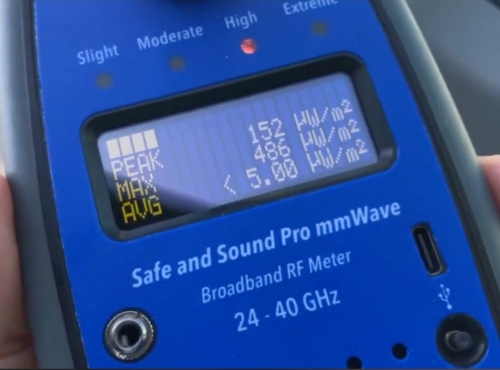
You’ll see the Safe and Sound Pro mmWave come up when researching 5G meters and it’s worth addressing directly. It measures millimeter wave frequencies between 20 GHz and 40 GHz, the high-band 5G found in very dense urban environments.

For most people it isn’t a relevant choice. Current 5G in the vast majority of locations uses sub-6 GHz frequencies, which all four meters above detect. Millimeter wave barely penetrates walls, travels only short distances, and exists in such limited locations that most people will never encounter it at measurable indoor levels. If you live on a block in a major city where mmWave 5G is actively deployed, it’s a niche tool that does one specific thing well. For everyone else, the four meters above cover what you’ll actually encounter.

What to Look for in an RF Meter

Before you spend anything, these are the specs that actually matter and the ones you can safely ignore.

Frequency range matters more than most specs. Make sure any meter covers at least 200 MHz to 6 GHz to capture modern Wi-Fi, cell, and 5G signals across the full electromagnetic spectrum. A meter that doesn’t cover the frequency your main RF source operates at is useless for that source.

Peak readings matter more than average. Pulsed digital signals like Wi-Fi and cell towers fire in rapid bursts. A meter that only shows average readings will significantly understate the actual exposure levels you’re experiencing. Look for a meter that shows both.

Audio is more useful than it sounds. The sound function on a quality RF meter lets you hear the signal pattern, which helps you identify sources without staring at the display. It sounds minor until you’re trying to figure out whether a reading is coming from your router or your neighbor’s smart meter.

An RF meter only covers part of your home’s EMF picture. Magnetic fields from wiring and electric fields from voltage require a separate meter. If you want to cover all three field types and measure overall emf levels in one device, my full breakdown of the best EMF meters for measuring magnetic, electric, and RF fields covers all your options in one place.

Frequently Asked Questions

Here’s what most people still want to know after reading through the reviews.

What does an RF meter measure?

An RF meter measures radiofrequency radiation, the wireless signals emitted by devices like Wi-Fi routers, cell towers, smart meters, Bluetooth devices, and cell phones. It picks up the electromagnetic energy those devices transmit and gives you a reading in µW/m² or V/m.

A quality RF meter will show you both peak readings, the momentary spikes when a device transmits, and average readings, which give you a better sense of ongoing exposure over time.

How is an RF meter different from an EMF meter?

RF is one type of electromagnetic field, so technically an RF meter is a type of EMF meter. In practice, dedicated RF detectors only measure radiofrequency radiation, while a standard all-in-one EMF meter also measures magnetic fields from wiring and electric fields from voltage.

I’ve broken down exactly how these two types compare in my RF meter vs EMF meter guide, including which one makes sense to buy first. If you want the full picture of what’s in your home, you need a meter that covers all three field types.

What should I look for when buying an RF meter?

Frequency range is the most important spec. Make sure any model you’re considering covers at least 200 MHz to 6 GHz to capture modern Wi-Fi, cell signals, and current 5G deployments.

Beyond that, look for a meter that shows both peak and average readings, has an audio function for source identification, and displays power density in µW/m². Those three things will take you further than any other feature on the spec sheet.

How reliable are consumer RF meters?

It depends on the meter. Quality varies significantly in this space, and a cheap meter with poor frequency response can give you a false sense of safety by missing signals it simply isn’t sensitive enough to detect.

The meters on this list are reliable enough for meaningful home evaluation and exposure assessment. For most people, the goal is to understand whether RF levels in a given area are low, moderate, or high, and a well-made consumer meter gives you a reliable way to do that.

What do RF meters typically cost?

The range runs from around $100 on the low end to $400 or more for professional-grade solutions. Budget meters under $150 often sacrifice frequency range and sensitivity.

The sweet spot for serious home use is $200 to $400, which is where you find meters with third-party calibration, full frequency coverage, and the audio and display features that make testing genuinely useful. Going above $400 gets you into professional territory that most home users don’t need.

Can a smartphone replace a dedicated RF meter?

No. A smartphone has no sensor capable of measuring radiofrequency radiation from external sources. What phones do have is a magnetometer used for compass navigation, and some apps use that to detect static magnetic fields.

But that sensor wasn’t designed for EMF measurement, the readings are unreliable, and it cannot detect RF radiation, electric fields, or the dynamic electromagnetic fields produced by wireless devices. A dedicated meter is the only reliable way to measure RF exposure in your home.

Will an EMF meter pick up Wi-Fi signals?

Yes, as long as it has an RF measurement mode that covers the 2.4 GHz and 5 GHz frequency bands that Wi-Fi operates on. Not all EMF meters do. Some budget models only measure magnetic fields and electric fields, with no RF capability at all. If detecting Wi-Fi radiation is part of your goal, check the frequency range of any meter before you buy.

Do RF meters need to be calibrated?

The meters on this list are factory calibrated before they ship. Consumer meters aren’t designed for ongoing user recalibration the way professional laboratory equipment is. For home use, factory calibration is sufficient. The Safe and Sound Pro II goes a step further with third-party certification from an independent lab, which gives you more confidence that the readings reflect real-world power density levels accurately.

Can RF radiation pass through walls and building materials?

Yes, though how much passes through depends on the frequency and the material. Lower frequency RF signals travel further and penetrate most common building materials easily. Higher frequency signals lose more energy passing through dense materials like concrete and brick.

This is relevant when you’re testing your home because the RF you’re measuring isn’t only coming from devices inside your house. Cell tower signals, a neighbor’s router, and smart meters on exterior walls can all contribute to the electromagnetic fields inside your living space. Measuring in multiple rooms and near exterior walls gives you a much clearer picture than testing in one spot.

This article is for informational purposes only and does not constitute medical or health advice. Always consult a qualified healthcare professional with any concerns about your health or environment.

Leave a Comment

RF Meter vs. EMF Meter: What’s the Difference and Which One Do You Actually Need?

If you’ve started shopping for equipment to test your home, you’ve probably noticed that some products are labeled “RF meters” and others are called “EMF meters.” It’s easy to assume they measure the same thing. They don’t, and buying the wrong one means you’ll miss most of what’s actually in your environment.

This is one of the most common points of confusion for people just getting into home testing, so let’s clear it up properly.

What EMF Actually Covers

EMF stands for electromagnetic fields, but that term is broader than most people realize. It’s an umbrella that includes several distinct types of fields, each with different sources, frequencies, and measurement units.

The three types you’ll encounter most in a home testing context are:

Magnetic fields come from electrical current flowing through wires, appliances, and power lines. They’re measured in milligauss (mG) or microtesla (µT). Magnetic fields pass through walls easily, which is why proximity to wiring matters even when you can’t see it.

Electric fields come from voltage, meaning they’re present even when a device isn’t turned on, as long as it’s plugged in. They’re measured in volts per meter (V/m). Electric fields are more easily blocked by materials than magnetic fields are.

Radiofrequency (RF) radiation travels as waves through the air and is emitted by wireless technology all around us. Your Wi-Fi router, cell phone, smart meter, and Bluetooth devices all produce RF. It’s measured in microwatts per square meter (µW/m²) or milliwatts per square meter (mW/m²).

What an EMF Meter Does

An all-in-one EMF meter measures multiple field types in a single portable device, typically magnetic fields, electric fields, and RF radiation. Some models measure all three with dedicated sensors. Others switch between modes manually.

When I started testing my own home, I used the Trifield TF2 as my primary EMF meter. It covers magnetic fields, electric fields, and RF in one handheld unit. That flexibility was exactly what I needed at the start, because I didn’t know which field type was going to be the most relevant in different parts of my house. The answer, as it turned out, was different in nearly every room.

An EMF meter is usually the right starting point for most people because it gives you a complete picture. You can identify whether a specific spot has elevated magnetic fields from wiring, elevated electric fields from plugged-in devices, or elevated RF from wireless sources, all without buying three separate pieces of equipment.

What an RF-Only Meter Does

An RF meter is a type of EMF meter that focuses entirely on radio frequency detection. It’s designed specifically to pick up the wireless signals that saturate most modern homes: Wi-Fi, 5G, cell towers, Bluetooth, baby monitors, cordless phones, smart appliances, and more.

RF meters are typically the tool of choice when you want to find the highest RF exposure areas in your home, run a comparison of routers or phones by emission level, test whether a shielding product is actually reducing RF in a specific location, or get a sense of what your local cell tower environment looks like from inside your house.

A good RF meter will show you both peak readings and average readings. Peak readings tell you the momentary spikes that occur when a device transmits. Average readings give you a better sense of what you’re living with over time.

Do Dedicated RF Meters Detect More Than a Standard EMF Meter?

This is worth addressing directly because the answer surprises people. A dedicated RF meter doesn’t necessarily detect higher signal levels than a standard EMF meter, but it tends to pick up weaker signals more accurately. EMF meters split their design across multiple field types, and the RF sensor in an all-in-one unit is typically less sensitive, which can create interference with accurate low-level RF measurements.

In practice, this means an EMF meter like the Trifield TF2 may show little or no RF activity in a location where a dedicated RF meter would register a measurable signal. For a general home safety assessment, the TF2 is more than capable of identifying meaningful RF sources. But if you’re trying to confirm that RF in a specific spot is genuinely low, or you’re testing the performance of a shielding product, a dedicated RF meter gives you more confidence in what the numbers actually mean.

The GQ EMF-390, which I added after the Trifield, is still a standard EMF meter that measures magnetic fields, electric fields, and RF. Its advantage is data logging and RF spectrum analysis, which lets you track readings over time and spot patterns a single spot measurement would miss. That’s useful for understanding how your environment changes throughout the day, not for getting more sensitive RF measurements than a standard EMF meter provides.

gq 390 emf meter data logging

The Limitation Nobody Talks About

Here’s what most buying guides skip: an RF meter will not tell you anything about the magnetic and electric fields in your home. And those fields matter.

Magnetic field exposure from wiring is one of the most studied areas in the EMF research literature. The IARC monograph on ELF electric and magnetic fields classified extremely low frequency magnetic fields as possibly carcinogenic to humans, based largely on epidemiological associations with childhood leukemia. The NIEHS echoes this, noting that while the evidence is not conclusive, ELF magnetic fields cannot be recognized as entirely safe. If you only have an RF meter, you’re completely blind to this part of your environment.

I’ve tested homes where the RF levels were modest and the magnetic field levels near certain walls or appliances were surprisingly high. Someone relying only on an RF meter would have walked away thinking everything was fine.

Which Type of Meter Should You Buy?

The honest answer depends on what you’re trying to learn, and the choices you make here will shape how useful your testing actually is.

Buy a standard EMF meter if: You’re new to home testing, you want to understand your full exposure picture, or you’re doing a room-by-room assessment for the first time.

Buy a dedicated RF meter if: You already have an EMF meter and want more sensitivity on the wireless side, you’re doing specific shielding tests where accuracy at lower signal levels matters, or RF from cell towers and routers is your primary concern.

Consider adding a data-logging EMF meter like the GQ EMF-390 if: You want to track how RF levels in your home change over time, or you want spectrum analysis to understand which frequency bands are contributing most to your readings.

For specific recommendations on which meters are worth the money, you can find my full breakdown of the best EMF meters for home testing and protection with readings, real-world results, and what I’d buy if I were starting over today.

Frequently Asked Questions

Here’s what most people want to know before they buy their first meter.

What is the difference between an RF meter and an EMF meter?

An RF meter is a type of EMF meter built specifically for radio frequency detection, picking up signals from Wi-Fi routers, cell phones, and Bluetooth devices. A standard EMF meter can also measure magnetic fields and electric fields from wiring and appliances. RF is one type of EMF, but a dedicated RF meter won’t pick up the other field types, and not all EMF meters are sensitive enough to detect weak RF signals accurately.

Is RF a form of EMF, or are they different things?

RF is a type of EMF. Electromagnetic fields span a wide spectrum, and radiofrequency waves sit at the higher-frequency end of the non-ionizing range. The lower end includes extremely low frequency magnetic fields from power lines and home wiring. They’re related but come from different sources, operate at very different frequencies, and need different sensors to measure properly.

Do cell phones emit RF radiation?

Yes. Cell phones transmit and receive data wirelessly using radiofrequency signals. Every time your phone connects to a cell tower, sends a text, loads a webpage, or syncs an app, it’s emitting RF radiation. The amount varies based on signal strength, how the phone is used, and how close it is to your body. Carrying your phone in a pocket or holding it directly to your head results in closer proximity to the RF source than using speakerphone or air tube headphones.

How much RF radiation does your phone emit while you sleep?

That depends on what your phone is doing overnight. If it’s on and connected to Wi-Fi or a cell network, it’s still syncing apps, receiving notifications, and emitting RF, even while you’re not using it. Measured on a meter, a phone sitting on a nightstand will show lower peaks than one actively in use, but it won’t read zero. Most phones also pulse RF intermittently as they check in with the network. The simple precaution is to keep it across the room, switch it to airplane mode, or use a dedicated alarm clock so the phone doesn’t need to be near your head for eight hours.

Is Wi-Fi a source of EMF or RF?

Wi-Fi is RF, and RF is a type of EMF, so it’s both. Wi-Fi routers operate in the 2.4 GHz and 5 GHz frequency bands and emit radiofrequency radiation continuously, even when no device is actively downloading anything. Standard routers pulse RF at regular intervals as part of how the protocol works. Low-emission routers like the JRS Eco are designed to reduce this idle pulsing, which can make a measurable difference on an RF meter.

Start With One Good Meter, Then Add From There

The single most useful thing you can do is pick up a solid EMF meter and spend a few hours walking your home. You’ll find things that surprise you. Some will be higher than you expected. Some spots you assumed would be bad will turn out to be fine.

That hands-on experience, those actual numbers in specific rooms, is worth more than anything you’ll read in a buying guide, including this one. Once you know your environment, you can decide whether a dedicated RF meter fills a real gap for you.

Start measuring. The rest follows.

This article is for informational purposes only and does not constitute medical or health advice. Always consult a qualified healthcare professional with any concerns about your health or environment.

Leave a Comment