Disclosure: this review contains affiliate links; if you buy through them we may earn a commission at no extra cost to you. (full disclosure)
Verdict up front: The Safe and Sound Pro II (around $400 to $450 USD) is the most trusted RF meter you can buy without stepping up to professional equipment costing four times as much.
It measures one thing (radiofrequency radiation, 200 MHz to 8 GHz), and it measures that one thing with better sensitivity, faster pulse capture, and more credible calibration than anything else in the consumer price range.
It’s the meter professional building assessors reach for, it’s my own reference instrument, and my hands-on readings with it, phones, routers, smart TVs, enterprise access points, are published below with photos.
But it is RF only, it has no data logging, and its ±6 dB accuracy spec deserves an honest explanation you won’t find in the marketing. All of that is below.
What It Is
The Pro II is a handheld broadband RF meter made by Safe Living Technologies, an instrumentation company in Guelph, Ontario that has been in the EMF assessment business for two decades.
“Broadband” means it doesn’t tune to one frequency; it sums up all the RF energy arriving across its range and reports the total as power density in microwatts per square meter (µW/m²).
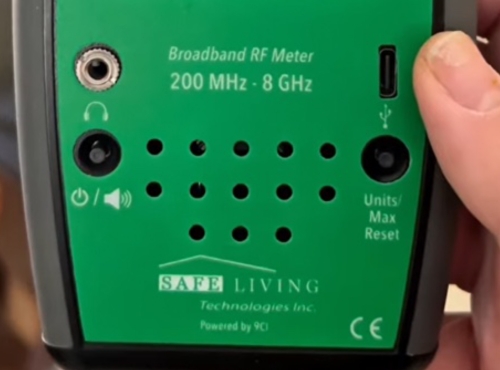
Its range of 200 MHz to 8 GHz covers essentially everything a modern home emits: cell phones and towers (4G and the sub-6 GHz frequencies that carry nearly all real-world 5G), Wi-Fi on both 2.4 and 5 GHz bands, Bluetooth, cordless phones, smart meters, baby monitors, and microwave oven leakage.
Each unit is individually calibrated and ships with its own calibration certificate, and the design is third-party performance tested by Nemko Canada, an accredited lab. That paper trail is genuinely unusual at this price and is a large part of why this meter, rather than cheaper alternatives, became the consumer standard.
Key specifications
| Spec | Safe and Sound Pro II |
|---|---|
| Measures | RF only (radiofrequency / microwave) |
| Frequency range | 200 MHz to 8 GHz effective; 400 MHz to 7.2 GHz true response (±6 dB) |
| Display range | 0.005 to 3,180,000 µW/m² (current firmware; earlier units 0.001 to 2,500,000) |
| Readings shown | Peak, Max Hold (resettable), and Average, on a 4-line OLED plus LED bar |
| Sampling | Under 5 microseconds (catches brief pulses) |
| Antenna | Built-in, single axis |
| Audio | Speaker with sound-signature output, 3 volume levels, headphone jack |
| Power | 2 AA batteries (12 to 15 hours) or USB jack for continuous monitoring |
| Logging | None |
| Calibration | Individually calibrated, certificate included; Nemko Canada certified design |
| Price | ~$400 USD (check current price: here) |
Why This Is The One Professionals Carry
Three capabilities separate it from the sub-$200 field, and all three matter in a real house.
1. Sensitivity that reaches ambient levels. The Pro II reads down to thousandths of a microwatt per square meter. That means it can see the faint RF background of a quiet rural bedroom, not just the blast next to a router. Cheaper meters bottom out far higher, showing “zero” in environments that aren’t zero, which makes before/after comparisons of small changes impossible.
2. Fast pulse capture with Max Hold. This is the big one. Modern wireless sources don’t transmit continuously; they pulse. A smart meter might transmit for a fraction of a second a few times a minute. Wi-Fi beacons fire in bursts. A slow meter averages over those bursts and reports a soothing low number that misses the peaks entirely.
The Pro II samples in under five microseconds and holds the maximum until you reset it, so you can leave it on a nightstand for ten minutes and know the highest level that actually occurred there. For measuring pulsed sources, this single feature is the difference between information and noise.
3. The audio signature. Turn on the speaker and the meter converts whatever it’s receiving into sound. Different sources have recognizably different rhythms: Wi-Fi’s tick, a cell tower’s cadence, a smart meter’s chirp, DECT’s steady buzz. SLT publishes a sound library so you can learn them. In practice this is how you answer the question a number alone can’t: not “how much RF is here” but “what is it coming from.” It turns source-hunting from guesswork into a game of recognition.
My Hands-On Readings So Far
How I reviewed this meter: the analysis on this page draws on SLT’s published specifications, the Nemko Canada third-party certification, independent evaluations by RF professionals, long-term owner feedback, and my own field use of the unit I bought. If the meter ever falls short of what’s written here, this page will say so.
A phone call at contact pins the meter. Holding an iPhone 13 against the Pro II during an active call drove the display to its ceiling, roughly 3,180,000 µW/m², and held it there.
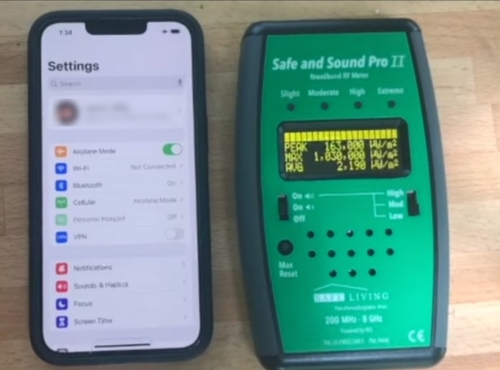
Two takeaways. First, the spec-sheet ceiling is a real, reachable number, not decoration. Second, this is the entire distance lesson in one frame: a transmitting phone at zero distance saturates a professional meter, and the same phone across the room barely registers. (Contact readings this close to an antenna are near-field and should be read as “enormous,” not as precise values; every meter carries that caveat.)
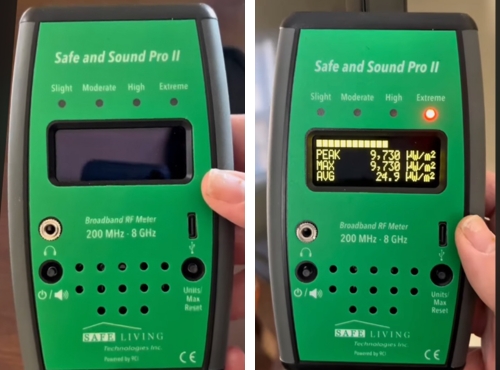
A smart TV taught the peak-versus-average lesson better than I ever have. Near a smart TV, the display showed peak and max readings around 9,730 µW/m² while the average sat at 23.7 µW/m², a roughly 400-to-1 ratio between the bursts and the background, with a second frame moments later catching 10,100 µW/m².
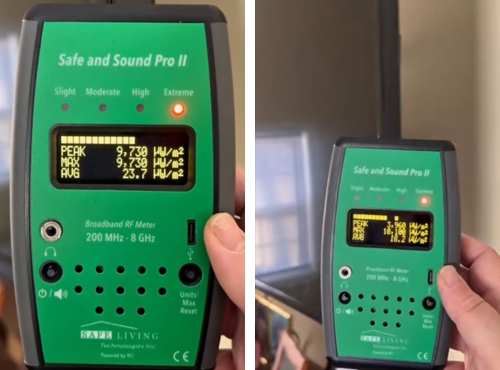
This is what “modern signals pulse” looks like in real numbers, and it’s exactly the behavior a slow meter without max hold would flatten into a reassuring average that misses the actual peaks.
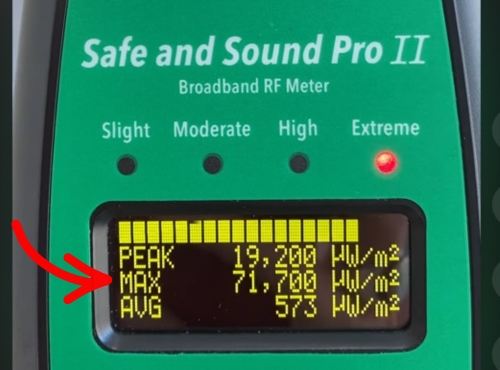
Enterprise Wi-Fi runs hotter than home Wi-Fi. Under a Ruckus wireless access point, the kind installed in offices, schools, and hotels, several feet away from the unit I recorded peaks of 71,700 µW/m² with averages fluctuating between roughly 5,300 and 41,900 µW/m².
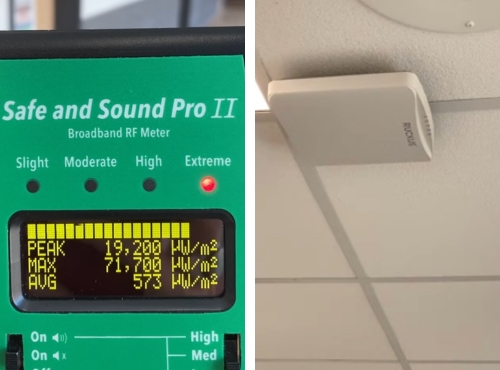
Worth knowing if your workplace ceiling has one directly overhead and you’re curious what it does.
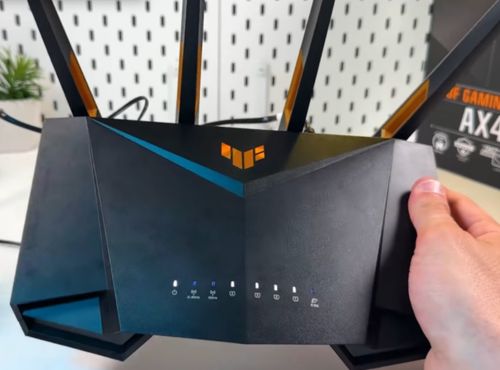
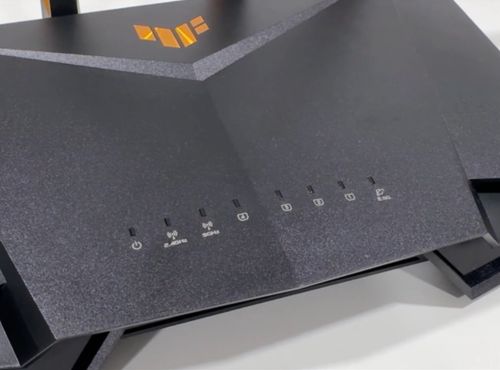
A home router a few feet away. My router measured instantaneous peaks near 1,500,000 µW/m² with max hold at 1,250,000 and averages around 39,200.
Outdoors, an unidentified source kept time. In open air away from our own devices, readings pulsed rhythmically between roughly 35 and 75.3 µW/m².
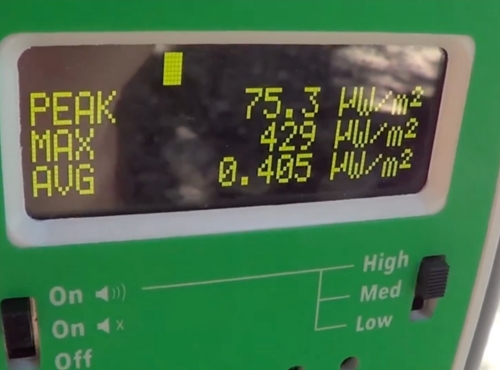
This is where the audio feature earns its keep: the sound signature is how you’d move from “something is pulsing” toward “that cadence is a cell tower,” and it’s the workflow we’d follow on camera in the video version of this review.
About the quietest reading we’ve seen. In my home environment, the display has never fallen below roughly 0.4 µW/m², well above the 0.005 µW/m² the spec sheet reaches. We’re deliberately not calling that a spec miss, because a sensitive meter in a normal neighborhood is supposed to read the ambient background, and ambient around 0.4 µW/m² is entirely plausible where I am.
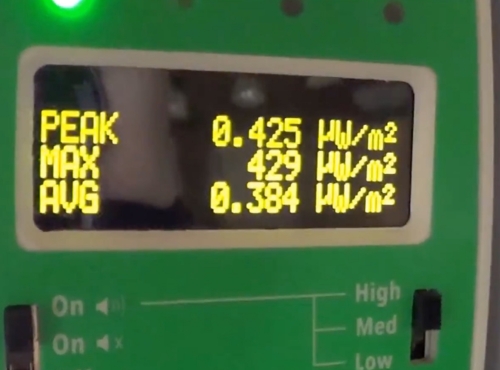
Distinguishing the meter’s true noise floor from our environment requires a reading somewhere genuinely RF-quiet, deep rural or shielded, and that test is on my bench list. What the observation does confirm: this meter never flatters you with a zero, which is honest behavior cheap meters fake.
How to read numbers like these. Two pieces of context keep them calm. First, FCC exposure limits for these frequencies sit around 10,000,000 µW/m² and are defined as time averages, so the comparable figure from any of our readings is the average, not the momentary peak; our smart TV’s 23.7 µW/m² average is roughly two ten-thousandths of a percent of the limit.
Second, you’ll see wildly different “levels of concern” cited across the EMF world because practitioners follow different scales, from health-based regulatory limits to building-biology precautionary targets thousands of times lower; there is no single universal threshold, which is why we teach readers the actual references and let them choose knowingly.
One technique note from use: I like to hold the meter at arm’s length and sweep slowly and steadily. Quick movements smear what you’re looking at, and your own body is a reflector and absorber the reading can feel.
The Honest Caveats
±6 dB is a wider window than it sounds. Decibels are logarithmic, and 6 dB corresponds to a factor of four in power density. That means a true 100 µW/m² field could legitimately read anywhere from roughly 25 to 400 µW/m² and still be inside spec, with accuracy also varying by frequency across the band.
Before you conclude the meter is imprecise junk, know two things: this is normal for every broadband consumer RF meter (the cheap ones are far worse and don’t publish the spec at all), and it’s exactly why we keep telling you to structure everything as a comparison.
On/off, near/far, before/after comparisons with the same meter are highly reliable. Treating any single absolute number as gospel is not, on this or any consumer meter.
It measures RF and nothing else. Magnetic fields from your wiring, appliances, and the electrical panel are invisible to it, and so are electric fields. If your concern includes those, you need a second instrument (or a 3-in-1 like the Trifield TF2, trading RF quality for coverage). Know which question you’re asking before you spend $400 answering only one of them.
It won’t see below 200 MHz or above 8 GHz. Below the band sits FM radio, some TV, and ham bands; rarely relevant indoors. Above it sits millimeter-wave 5G (24 GHz+). Here’s the honest context for a US reader: mmWave 5G exists mainly on specific urban blocks, in stadiums, and in dense downtown deployments, it barely penetrates buildings, and the overwhelming majority of 5G traffic Americans actually receive rides on sub-6 GHz frequencies this meter covers well.
If you live beside a visible mmWave small cell and want to measure it, that requires specialized gear (SLT sells a separate mmWave meter for exactly this), but for a typical home, 200 MHz to 8 GHz is the band that matters.
No logging. The USB jack powers the meter continuously, but it records nothing. If you want overnight exposure logs or graphs, this meter can’t produce them; you’re limited to what Max Hold captured while you were away. The budget GQ EMF-390 logs and this doesn’t, which stings at this price.

Single-axis antenna. Readings vary somewhat with how you orient the meter relative to the source. The practical fix is the one professionals use: hold the meter at arm’s length, keep your body out of the line to the source, and rotate slowly through orientations at each spot, taking the maximum. Slow, steady movement matters more than people expect; quick sweeps smear the reading. It works fine, but it’s a technique you have to know, and the manual-reading habit matters more here than on a triaxial instrument.
What Owning It Is Actually Like
After 3 months with mine, a few things stand out. The OLED is bright and readable in a dark bedroom and in direct sunlight, which matters more than I expected. The controls are just a power switch, volume, and a Max reset button, nothing to configure. I handed mine to someone who’d never held a meter and they had useful readings in a minute.
The build quality and the calibration certificate are the two things that made the price feel justified to me, and they’re the same reasons that come up again and again in other long-term owner reviews. My own recurring gripes: battery life is only 12 to 15 hours, so I keep spare AAs in the case or run it off USB; the LEDs are brighter than I’d like for nighttime bedroom use; and I eventually wished it logged data.
One behavioral note worth passing on, and it’s the arc the physics predicts: my readings turned out to be dominated by a handful of placements and habits. I fixed those, verified the drop, and the meter has mostly lived in a drawer since. That’s the correct outcome. This is a diagnostic tool, not a lifestyle device, and the best $400 outcome is that it makes itself unnecessary within a week.
How It Compares
For the full lineup and how I rank them, see my best EMF meters list. Here’s how the Pro II stacks up against the meters people most often cross-shop it against.
vs. Trifield TF2 (~$170): Different tools. The TF2 answers three questions adequately; the Pro II answers one question well. If wireless sources are your concern, the Pro II’s RF measurement is in a different league. If you want one device for wiring, appliances, and wireless, buy the TF2 and accept indicator-grade RF numbers. (Full TF2 review)

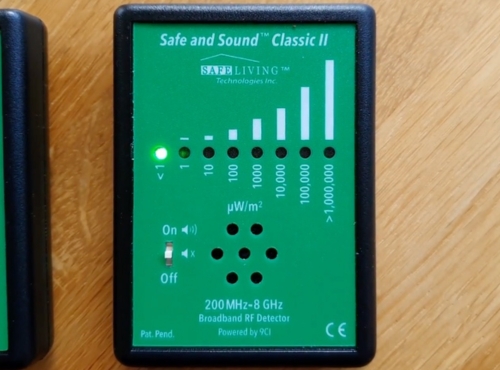
vs. Safe and Sound Classic III (~$200): Same maker, same band, but LED-only indication without numerical readout. Fine for “more here, less there” source hunting; useless for documenting numbers. If you’ll ever publish, compare, or track readings, the numeric display earns its premium.
vs. Acoustimeter AM-11 (~$400, now hard to find new): For years the Pro II’s closest rival, same 200 MHz–8 GHz range, same audio-signature approach, respected UK design. Two real differences: the Pro II shows peak, max, and average all in µW/m², while the Acoustimeter reports peak in V/m and average in µW/m², so you convert units before its own numbers line up; and the Pro II ships with an individual calibration certificate. Since the Acoustimeter is now largely used-only, the Pro II is the easier recommendation by default.
Who Should Buy It, and Who Shouldn’t
Buy it if: wireless RF is specifically what you want to measure; you want numbers credible enough to base purchase decisions on; you plan to test shielding products, where sensitivity and pulse capture are the entire job; or you want the same instrument the professional assessors use without the four-figure price. If that describes you, the Safe and Sound Pro II is the one to get.
Skip it if: your concerns include wiring and appliance magnetic fields (get the TF2, or both); you want logging and graphs (GQ EMF-390, with the accuracy tradeoff); you just want a rough sense of loud vs quiet spots (Classic III at half the price); or $400 is painful, in which case remember that distance and duration cost nothing and don’t require any meter to work.
Is the Safe and Sound Pro II Worth It?
In a product category crowded with toys, the Safe and Sound Pro II is a real instrument: individually calibrated, third-party certified, sensitive enough to see ambient background, and fast enough to catch the pulsed transmissions that define modern exposure.
Its limitations are real (RF only, no logging, single axis, ±6 dB like every broadband meter), but they’re the honest limitations of physics and price, not corner-cutting. It’s the reference meter this site’s testing is built on. If you’re going to own one serious RF meter, this is the one. If you’re still comparing, my best RF meters roundup shows exactly where it lands against the others worth a look.
Check current price: click here
Sources
Manufacturer / primary
- Safe and Sound Pro II product page — specs, price, calibration
- Pro II user manual (PDF)
- Safe Living Technologies’ summary of the Nemko Canada certification
- Safe and Sound Classic III product page
Comparison products
- Acoustimeter AM-11 manufacturer page and specs (full manual)
- Trifield TF2 manufacturer page (owner’s manual PDF)
- GQ EMF-390 product listing (user guide PDF)
Regulatory / context
FCC: Human Exposure to Radio Frequency Fields (cellular antenna sites)
This article is for informational purposes only and does not constitute medical or health advice. Always consult a qualified healthcare professional with any concerns about your health or environment. Here is a link to my to medical disclaimer and testing methodology pages.