Yes, RF passes through most common building materials, weakened but not stopped. Drywall and wood barely slow it, brick and concrete take a real bite, and metal stops it almost completely.
How much gets through depends on the material, its thickness, and the signal’s frequency. That one sentence explains why your phone works indoors, why the basement has bad signal, why you can measure your neighbor’s router, and why certain windows quietly block more than shielding products do.
This is the companion page to my list of the best RF meters guide, because a meter is how you see all of this in your own house.
The Rough Numbers, Material By Material
Attenuation is measured in decibels. If dB is new to you, the short version is all you need here: 10 dB blocks 90% of a signal, and 20 dB blocks 99%. Every material below is just a bigger or smaller version of that same idea.
Typical values at Wi-Fi-type frequencies, from building-penetration research:
| Material | Rough attenuation | What gets through |
|---|---|---|
| Drywall (one wall) | 2 to 4 dB | Most of it |
| Interior wood door | 3 to 5 dB | Most of it |
| Clear glass window | 2 to 4 dB | Most of it |
| Brick wall | 6 to 10 dB | Roughly 10 to 25% |
| Poured concrete | 10 to 20+ dB | 1 to 10% |
| Low-E coated glass | 20 to 40 dB | 1% or less |
| Metal siding, foil-backed insulation | 30+ dB | Almost nothing |
Treat these as ranges, not gospel. Real walls contain studs, wiring, pipes, and moisture, and thickness matters.
The Surprise In That Table: Your Windows
Low-E glass, the energy-efficient coating on most modern windows, is a thin metallic layer. Metallic layers block RF.
That’s why new construction often has worse cell signal than old houses, and why your energy-efficient windows may already be doing more RF shielding than products sold for the purpose. If you’ve ever wondered why the signal improves when you open a window, now you know.
Frequency Changes Everything
Higher frequencies penetrate worse. It’s the rule that organizes modern wireless.
2.4 GHz Wi-Fi reaches the garage; 5 GHz fades a room earlier. Low-band cellular reaches deep indoors, which is exactly why carriers use it for coverage.
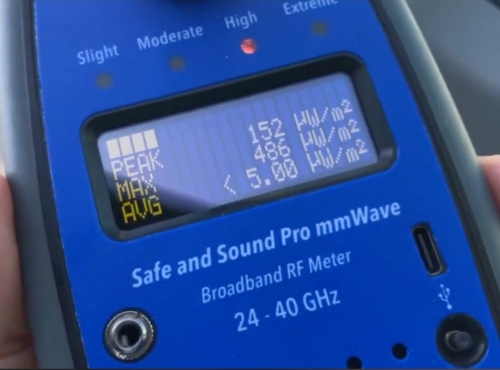
And millimeter-wave 5G, at 24 GHz and up, is stopped by nearly everything, including a wall, a window, and foliage. That’s why it’s deployed on street corners rather than towers, and why indoor mmWave exposure from outdoor transmitters is essentially a non-issue.
What This Means In Your Actual House
Your walls are already free shielding. Indoor readings from outdoor sources (towers, the neighborhood’s networks) run meaningfully lower than outside. Take an outside baseline and an inside reading and you’ll see your house’s built-in attenuation directly.
The apartment-wall reality. A shared drywall wall barely attenuates, so your neighbor’s router on the other side is, RF-wise, nearly in your room. Distance from that wall remains the free fix, and the genuine shielded-sleep option is a canopy, not a painted wall, for the geometry reason below.
Why shielding one wall mostly fails. RF that’s blocked by your treated wall still arrives through the other walls, the windows, the ceiling, and the floor. Partial barriers redirect the problem; enclosures solve it, which is the whole lesson of every Faraday product I review.
Why your phone still works inside. A few dB of wall is nothing to a system engineered with enormous link margins. Your phone compensates for penetration loss by transmitting harder, which is also why weak-signal locations raise your exposure from your own device.
The Critical Contrast: Magnetic Fields Ignore All Of This
Everything above applies to RF only. Power-frequency magnetic fields, from wiring, panels, and appliances, pass through every material in that table as if it weren’t there, metal included.
No wall, no fabric, no foil changes them; only distance does. Mixing up these two field types is the most expensive confusion in this niche.
See It Yourself In Ten Minutes
Take any RF meter and measure a steady outdoor signal from the yard, then at the window, then mid-room, then the basement if you have one. You’ll watch your own house’s attenuation appear in the numbers.
Then run the opposite demo: a gauss reading through a wall from a known appliance, unchanged, to feel the contrast.
Whatever the numbers show, the honest summary is worth repeating: indoor readings from outdoor sources are usually small fractions of already-conservative limits before you change anything at all.
Walls, Summed Up
RF gets through your walls the way sound gets through them: weakened, unevenly, and more at some frequencies than others. Drywall is nearly transparent, concrete takes a real toll, metal ends the conversation, and your energy-efficient windows are the quiet overachievers.
Your house is already a mediocre Faraday cage, your meter can show you exactly how mediocre, and the fields that ignore walls entirely were never RF in the first place. That’s the whole answer, and it’s most of this subject’s physics in one page.how mediocre, and the fields that ignore walls entirely were never RF in the first place. That’s the whole answer, and it’s most of this subject’s physics in one page.
Sources
- NIST research on radio propagation and building material attenuation
- ITU-R P.2040: Effects Of Building Materials And Structures On Radiowave Propagation
- FCC: Wireless Devices And Health Concerns
- ICNIRP Radiofrequency Guidelines (2020)
This article is for general information and isn’t medical advice. Medical disclaimer.