Disclosure: this review contains affiliate links; if you buy through them we may earn a commission at no extra cost to you. (full disclosure)
I have been using the Safe and Sound Pro mmWave (check price on Amazon) for three months, both around my own neighborhood and out in the field. Here is what I have learned about who it is actually for.
My Verdict Up Front
The Safe and Sound Pro mmWave (around $900 for the standard stub configuration, more once you add the horn antenna or attenuator; verify current pricing) is a genuinely rare instrument. It is the first widely available consumer-priced meter that can measure high-band millimeter wave 5G, covering 20 GHz to 40 GHz.
That is a range every ordinary RF meter, including its own sibling the Pro II, is completely blind to. It is well engineered, and its only real competition costs several times more or comes from one newer combo meter I cover below.
Even so, my honest advice is that most readers should not buy it. Most Americans have little to no mmWave signal around them to measure.
This review explains who the exceptions are, and what this meter can and cannot tell them.
Is There Any mmWave Near You?
This is the question that decides everything. Millimeter wave is the high band of 5G: frequencies around 24 to 39 GHz that carriers market under names like Ultra Wideband. Two facts about it determine whether this meter is relevant to you.
Deployment is sparse. mmWave signals travel short distances and are easily blocked by walls, trees, windows, rain, and even your own hand. Because of that, carriers concentrate it where lots of people need bandwidth in a tight space: dense downtown blocks, stadiums, arenas, airports, and transit hubs. In cities that has meant bolting mmWave nodes onto street furniture, light poles and traffic signals along busy corridors. So you’ll often spot them lining downtown streets, not just packed inside big venues.
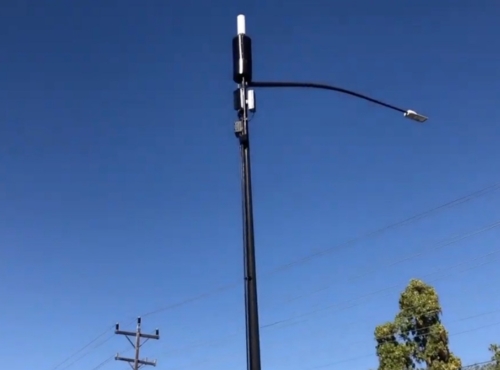
The 5G that covers the rest of America, including nearly every suburb and all rural areas, runs on low and mid-band frequencies below 8 GHz. A standard meter like the Safe and Sound Pro II already measures those well. If you do not live or work within sight of a mmWave small cell, there is likely nothing in the 20 to 40 GHz band at your home but noise floor.
It barely gets indoors. The same physics that limits deployment means outdoor mmWave mostly stays outdoors. Measurements inside buildings near mmWave cells typically come in far below the outdoor street-level readings, which are themselves small fractions of FCC exposure limits.
So before spending this kind of money, do the free check. Look at your carrier’s coverage map for high-band or UWB areas, and look around your block for small cell installations on light poles and rooftops.
If the answer is “none nearby,” your money is better spent on the Pro II, or on nothing. I say that as someone who earns a commission if you ignore me.
What I Measured In The Field
For the readings below I used the stub (semi-omni) antenna, the one the standard meter ships with. This is the single most important thing to understand before buying, so I want to show you what the behavior actually looks like.
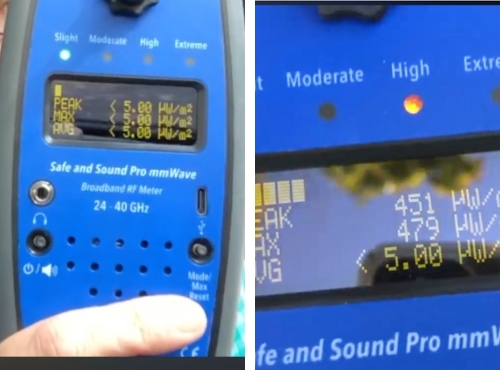
There is a mmWave small cell about two blocks from my house. At my own home, two to three blocks away, I pick up nothing from it. That distance is already far enough that the millimeter waves do not reach me, and the meter simply displays <5.00, which is the lowest reading it can show.
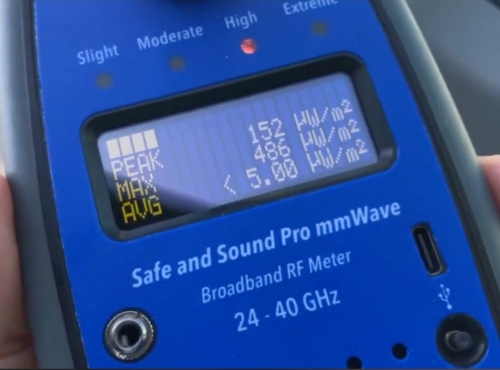
As I got closer, the numbers started to climb. Standing right at the antenna with the meter pointed at it, I hit 472 µW/m² on both the peak and max readings.
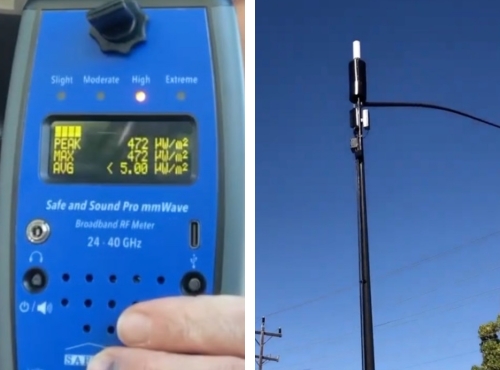
Here is a detail that surprises people. The panels on these poles radiate outward, not straight down, so standing directly at the base is not where the signal is strongest. As I stepped back away from the pole, my reading actually rose again, up around 219 µW/m², before falling off as the distance grew. By roughly 75 feet it was dropping back toward the floor.
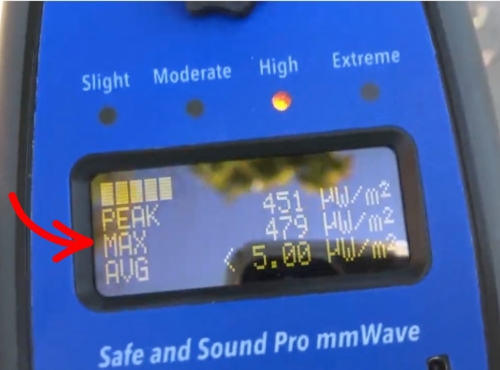
A single tree between me and the antenna was enough to kill the signal. It dropped straight to <5.00, then jumped back to 451 µW/m² peak the moment I moved past the tree and cleared its cover. A brick house does the same thing, which means the homes along that street are likely getting very little from this cell.
Now the part that matters most for your buying decision. Standing at that exact same spot, I switched to my Pro II, which reads the 200 MHz to 8 GHz range where 4G and low and mid-band 5G live. It read roughly 2,350 µW/m², vastly more than anything the mmWave meter registered at the same location.
That gap is the whole point. These 5G poles almost always carry 4G and LTE antennas as well, often stacked right on top, because 5G leans on 4G to work at all. The mmWave meter cannot see any of that lower-band energy, so a low mmWave number does not mean your total RF exposure is low.
In other words, most of the actual field strength at that tower was in the lower bands the Pro II covers, not in the millimeter wave band at all. Each meter is blind to the other’s range, and that is exactly why I tell people to buy the Pro II first.
Who Actually Needs One
There are five legitimate buyer profiles.
You live or work with a mmWave small cell in direct view, especially an urban apartment with a pole-mounted cell outside the window, and you want real numbers instead of wondering.
You use mmWave fixed wireless home internet, where a receiver on or near your home talks to a nearby cell, and you want to measure what is present indoors.
You are a professional (building assessor, EMF consultant, home inspector) and you need to detect and measure high-band 5G yourself. Many clients will not even know mmWave exists or think to ask about it, so being equipped to find it and put real numbers to it is part of doing the job properly.
You test products or claims, as I do. A wave of “5G protection” products is marketed specifically against mmWave, and verifying any claim about it requires an instrument that can actually see it.
You want the complete picture on principle and the budget genuinely does not hurt. That is a preference, and it is yours to make with clear eyes.
Everyone else: the Pro II covers the band where your real exposure lives.
What It Is And What’s In The Box
The Pro mmWave is a handheld broadband power-density meter for 20 to 40 GHz. It is made by Safe Living Technologies, the same Guelph, Ontario instrumentation company behind the Pro II, and it deliberately mirrors that meter’s operation.
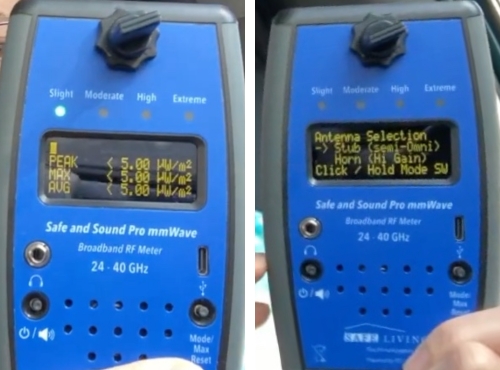
You get a digital display switchable between µW/m² and V/m (hold the Max Reset button for three seconds to toggle), plus peak, average, and resettable max-hold readings. There is a speaker with adjustable volume that turns sources into audible signatures, along with a headphone jack that mutes the speaker.
It runs on AA batteries with a USB-C jack for continuous operation, and it has a 30-minute auto-off. It protectively shuts down if hit with extreme levels, and an optional 100x (20 dB) attenuator extends the top of the range for close-to-source work.
The standard model ships with the stub antenna, a carrying case, a user’s guide, two AA batteries, and a two-year warranty. The horn antenna and the attenuator are sold separately, so factor that in when you compare prices.
One feature I appreciate, the same as on the other Safe and Sound meters, is the colored LED scale (slight, moderate, high, extreme). If you would rather not interpret raw numbers, the light gives you an at-a-glance sense of how strong a source is, which makes the meter approachable for people who are new to this.
The antenna choice matters more than any other spec:
Stub (semi-omni) antenna: receives from all directions and measures roughly 5 to 500,000 µW/m². Use it for “what is the ambient level in this room.” Safe Living Technologies suggests sweeping it slowly in a figure-eight motion, and cites roughly 50 degrees of coverage front and back.
Horn antenna: directional, roughly 20 times more sensitive at the bottom (0.5 to 30,000 µW/m²), with about 35 degrees of coverage in front. Use it for “which direction, which pole, which device.”
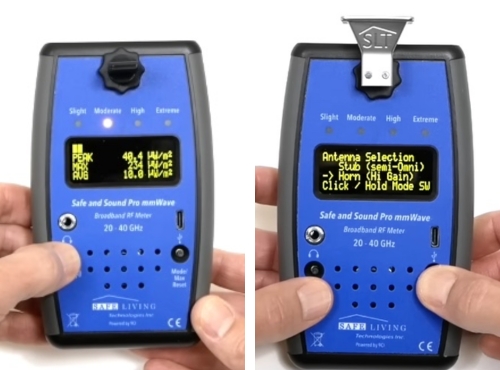
If your budget only covers one configuration, think about which question you will actually be asking. Source-hunting near a known cell favors the horn, while general ambient checks favor the stub. Serious users will want both.
Key Specifications
| Spec | Safe and Sound Pro mmWave |
|---|---|
| Measures | RF power density, high band only |
| Frequency range | 20 to 40 GHz, flat response, ±6 dB (reduced tolerance down to 18 GHz) |
| Range (stub antenna) | 5 to 500,000 µW/m² |
| Range (horn antenna) | 0.5 to 30,000 µW/m² |
| Units | µW/m² or V/m, user-switchable |
| Readings | Peak, average, resettable Max Hold |
| Audio | Speaker with source sound signatures, volume control, headphone jack |
| Power | AA batteries or USB-C continuous; 30-min auto-off |
| Logging | None |
| Extras | Optional 100x attenuator; self-protective shutdown at extreme levels |
| In the box (standard) | Meter, stub antenna, case, user’s guide, 2 AA batteries, 2-year warranty |
| Price | ~$850 standard (stub only); horn and attenuator extra [VERIFY + AFFILIATE LINK] |
A note on the range: Safe Living Technologies markets this meter inconsistently, with some of its own pages saying 24 to 40 GHz and others 20 to 40 GHz. The manual specifies a flat ±6 dB response from 20 to 40 GHz with reduced tolerance down to 18 GHz, which is the figure I have used here.
The Honest Caveats
Its sensitivity floor is high, and that is physics, not a flaw, but you need to understand it. The stub configuration starts at 5 µW/m². The Pro II reads a thousand times lower.
So if you point this meter around a typical home far from any mmWave cell and see nothing, that is the expected result twice over. There is likely no signal, and faint traces below 5 µW/m² would not register anyway.
The correct reading of a silent Pro mmWave is “no meaningful mmWave here,” which for most buyers will be the result every time, everywhere. Decide before purchase whether that confirmation is worth the price to you.
Beamforming makes mmWave inherently spiky to measure. These cells do not radiate evenly like a lightbulb. They aim narrow beams at devices that are actively using them, so levels at your position can jump when a nearby phone pulls data and vanish when it stops.
Expect readings that move moment to moment, use Max Hold over minutes rather than trusting a single snapshot, and do not read that variability as a malfunction. It is the nature of the technology being measured.
It cannot identify carriers or decode anything. Like all broadband meters, it reports total in-band energy plus an audio signature. It will not tell you “that is Verizon n260.”
Watch out for non-5G sources in the same band. Because the meter reports any energy between 20 and 40 GHz, it can register things that are not 5G at all. Some automatic-door and motion sensors, for example, use 24.125 GHz radar that sits squarely in range.
±6 dB again. As with the Pro II, the accuracy window spans a factor of four in power density, which is normal for broadband instruments at any consumer price. Comparisons with the same meter are trustworthy, while single absolute readings are approximate.
No logging at a price where it would be reasonable to expect it. Max Hold is your only unattended-measurement tool.
How It Compares
vs. Safe and Sound Pro II (~$400): These are not competitors, they are complements. The Pro II covers 200 MHz to 8 GHz, where effectively all of a normal home’s RF lives, while the mmWave covers 20 to 40 GHz, where almost nothing lives unless you are near a deployment.
If you own neither and can buy one, buy the Pro II. The mmWave is the second purchase, for the minority who need the high band.
vs. professional spectrum analyzers: Instruments from the professional test-equipment world that reach 40 GHz cost several times more and take training to operate. That is the real comparison set for accuracy, and it is why the Safe and Sound’s price is reasonable for what it is.
vs. cheap “5G detectors” on Amazon: Anything under $100 claiming to detect 5G is picking up, at best, the sub-6 GHz bands any meter sees, and often nothing meaningful at all. No inexpensive consumer device measures 20 to 40 GHz. If a listing implies otherwise, that listing is the product.
Who Should Buy It, And Who Shouldn’t
Buy it if: a mmWave small cell is in view of where you live or work and you want real numbers; you use mmWave fixed wireless internet; you assess buildings professionally; or you test high-band claims and products, as I do.
Skip it if: your carrier map and your street show no mmWave nearby, which is most American addresses; or you have not yet bought a general RF meter, which answers the questions that actually describe your exposure. If you are looking at this meter mainly to calm a worry about 5G in general, start with my best RF meters guide instead, because the frequencies you are worried about are almost certainly ones a much cheaper meter already measures.
Frequently Asked Questions
Does this meter detect all 5G? No. It only sees high-band millimeter wave 5G (20 to 40 GHz). Low and mid-band 5G, which is the overwhelming majority of 5G in use today, sits below 8 GHz and needs a meter like the Pro II. See my best EMF meters guide for the fuller picture.
Does the Safe and Sound Pro mmWave detect C-band 5G?
No. C-band sits at roughly 3.7 to 4.0 GHz, far below this meter’s 20 to 40 GHz window, so it will not register at all. C-band is mid-band 5G, and this meter is built only for the high-band millimeter wave range. To measure C-band you need the Pro II, whose 200 MHz to 8 GHz range covers it comfortably. The two are designed to work as a pair: the Pro II for everything up to 8 GHz, the mmWave for the high band above it.
Do I need this if I already have a Pro II? Only if you are near a mmWave deployment or fall into one of the buyer profiles above. For most homes, the Pro II already covers where your exposure actually is.
Will it detect anything inside my home? Usually not, unless you are very close to a mmWave cell or use mmWave fixed wireless internet. mmWave is easily blocked by walls, windows, and even a single tree, so it rarely makes it indoors at a meaningful level.
Does it come with both antennas? No. The standard model includes the stub (semi-omni) antenna. The horn antenna and the attenuator are purchased separately.
So, Should You Buy One?
Here is where I land after three months with it. This is a well-built instrument that fills a slot almost nothing else fills at a consumer price, and it carries the same sensible design as the Pro II, with the antenna options a directional band like this genuinely needs.
My hesitation is not about the meter, it is about whether it matches your reality. High-band 5G is rare, short-ranged, and mostly stays outside your walls. I watched it die at a single tree and disappear two blocks from a live cell, and for the large majority of American homes this meter will faithfully report silence at a serious price.
If you are one of the exceptions, a cell outside your window, a professional practice, or product testing, then it is the right tool and close to the only dedicated one. If you are not, put the money toward a Pro II and a cheap timer plug, and you will get far more out of both.
Check current price and configurations on Amazon: Safe and Sound Pro mmWave
Sources
Verizon 5G Ultra Wideband coverage map (carrier mmWave / Ultra Wideband deployment for context)
Safe Living Technologies, Safe and Sound Pro mmWave product page (specifications, price, included accessories, antenna options)
Safe and Sound Pro mmWave operation manual (PDF)
Safe and Sound Pro mmWave Keysight calibration certificate and third-party (STEEP) test results
Safe and Sound Pro II product page (for comparison)
FCC RF Safety FAQ and RF exposure limits
This article is for general information and is not medical advice. A meter reports field levels; it cannot assess health. (medical disclaimer)