If you’re looking for a low EMF WiFi router that still performs like a real router, the JRS Eco 100 Era is the one I’ve been running in my own house. Most routers broadcast a beacon signal about ten times a second, whether anyone is using the internet or not. This one is built to stop doing that when no device needs it. Here’s what it actually does, what I measured, and where it falls short.
What the JRS Eco 100 Era Actually Is
The Eco 100 Era is a WiFi router based on the Asus TUF Gaming AX4200, but running custom firmware from JRS Eco instead of stock Asus software. They didn’t reinvent the router. They took a solid, well reviewed Asus router and rewrote the part that controls how it broadcasts WiFi.
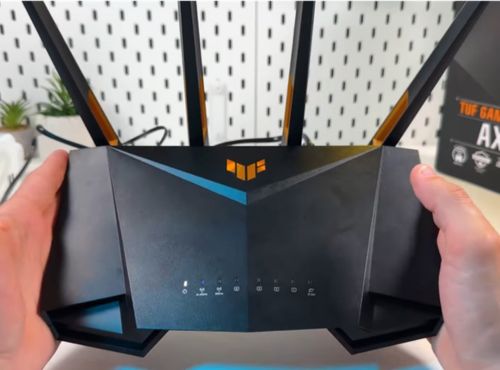
The core feature is a mode JRS calls Full Eco. When no devices are actively using WiFi, the router stops broadcasting entirely. The moment a connected device asks for WiFi again, it wakes back up, usually within a second or two. JRS also claims an 87 percent reduction in beacon pulse rate compared to a standard router, even outside of Full Eco mode.
Everything else is modern router spec sheet: AX4200 speeds, a 2.5 Gbps internet port, four gigabit LAN ports, and WPA3 security. It also supports WireGuard and OpenVPN if you want to run a VPN, and has a USB 3 port for file sharing or a shared printer.
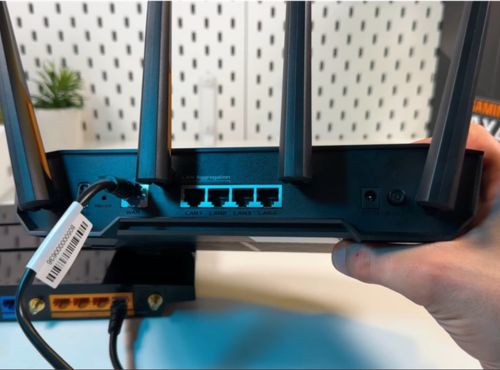
The base router supports Asus AiMesh, so larger homes can extend coverage with a second compatible unit. I haven’t tested how the low EMF features hold up across a multi-router mesh setup, so if that’s your situation, confirm with JRS directly before buying more than one.
It runs a little over $300 on the the JRS Eco website, backed by a 2 year warranty and a 30 day return policy. You’re paying for the firmware, not the hardware itself.
Setting It Up in My House
Installation took about half an hour, most of which was spent turning off the WiFi on my internet provider’s modem. This part is easy to overlook. The Eco 100 Era is a router, not a modem, so it plugs into your existing modem with an ethernet cable. If your provider’s modem has its own WiFi built in, you need to disable that separately, or you end up with two WiFi signals running at once, which defeats the purpose.
Once that was sorted, connecting my phone, laptop, and other devices was simple. The one quirk worth knowing about is the hidden “jrs” network. Your devices need to connect to it briefly during setup so the router recognizes them as devices allowed to wake it from standby. It’s a small extra step, but not one you’d expect if you’re used to a normal router.
What I Measured
I ran my Trifield TF2 and GQ EMF-390 through the house before and after switching. With the router sitting in Full Eco standby, meaning no devices were actively pulling data, I measured zero RF output at the router itself. With WiFi active on a device, readings climbed but stayed noticeably lower than what I recorded from my old router at the same distance.
The bigger difference showed up overnight. My old router pulsed a beacon signal all day and all night, whether anyone needed it or not. With the Eco 100 Era in Full Eco mode overnight, readings from the router dropped to zero for the hours nobody was using a device. That’s the window I cared about most, since that’s when we’re in the room the longest and least likely to need active WiFi.
This is one home, one set of meters. Your results may vary, but this gives you a real data point instead of just marketing copy.
What I Like
- Full Eco mode genuinely drops to zero output when nothing needs WiFi, confirmed with two different meters
- Wakes up fast enough that I never notice a delay
- Performs like a full featured modern router, not a stripped down version
- The Tx power slider lets you dial in only the range you need instead of blasting a full home’s worth of signal into a small apartment
- WPA3 security and VPN support mean you’re not giving up anything on the security side
- A 2 year warranty and 30 day return policy take some of the risk out of the price
Worth Knowing
- You have to disable WiFi on your existing modem yourself, and depending on your provider, that step can be more annoying than it sounds
- Every device needs to connect to the hidden “jrs” network once during setup
- It’s a genuinely large router, more so than most consumer routers, so make sure you have the shelf space
- At over $300 it costs more than most consumer routers
- Some users report occasional reboots being necessary, though I haven’t run into that yet myself
- If you have smart home devices that stay connected around the clock, like smart speakers or a video doorbell, Full Eco mode may rarely trigger on its own since something is always asking for WiFi. You still get the reduced pulse rate benefit any time WiFi is active, and you can force a guaranteed off window using the built in scheduler regardless of what’s connected
My take: if cutting the constant RF output in your home matters to you and you don’t want to sacrifice router performance to get there, the JRS Eco 100 Era is worth it. There isn’t really another product on the market doing exactly what Full Eco mode does, so this is less about comparing it to a cheaper alternative and more about deciding if the feature itself is worth it to you. It’s the one running my network right now, and my own readings back up what JRS claims it does.
Check price on the JRS Eco website
Frequently Asked Questions
Here are the questions I get asked most often about this specific router.
Will this still help if I have smart home devices that are always connected?
Yes, but with a caveat. Full Eco mode relies on nothing asking for WiFi, so a smart speaker, video doorbell, or similar always-on device can keep the router from ever fully idling. You still get the 87 percent reduced pulse rate any time WiFi is active, and you can use the router’s built in scheduler to force a guaranteed off window, like overnight, no matter what’s connected.
Could I just do this myself by changing settings on my own router?
You’ll find real skepticism about this on tech-focused forums, where some argue you’re paying for something you could set up yourself by adjusting a router’s beacon interval. There’s some truth to that if your router happens to expose that setting, which most consumer routers don’t. But even on routers that do, it only reduces beacon frequency. It doesn’t replicate the on-demand full standby behavior, where the router goes completely silent and wakes back up automatically the moment a device asks for WiFi. That combination is what you’re paying JRS’s firmware for.
Does using this router slow down my internet?
Not in my experience. It’s still running full AX4200 speeds, and I haven’t noticed any drop in speed or range compared to my old router.
Why I Wanted a Lower EMF Router in the First Place
A router doesn’t just turn on when you need it. It runs continuously, all day and all night, in the same spot in your home, whether anyone is using it or not. That’s the part that made me want more control over mine.
The ICNIRP exposure guidelines that most routers are built around were set to prevent short term heating effects, and they haven’t been substantially updated to reflect the growing research on long term, low level exposure, including findings from the National Toxicology Program study and the Ramazzini Institute.
Hundreds of researchers have signed the International EMF Scientist Appeal calling for stronger standards. Regulators have been slow to act on environmental health risks before, asbestos and lead being the obvious examples. That history doesn’t prove WiFi is next in line. It just means reducing exposure where it’s easy to do isn’t overreacting. It’s a reasonable precaution while the research catches up.
Where to Get This Low EMF Router
Everything in this review comes from my own testing, not manufacturer claims. If reducing the constant RF output in your home is worth it to you, this is the router doing it, and it’s the one I’m still using. Check the price on the JRS Eco website.
This article contains affiliate links. If you purchase through these links I may earn a commission at no additional cost to you. I only recommend products I have personally used and would recommend regardless of any commission.
I’m not a doctor or an engineer. Nothing in this review is medical advice. If you have specific health concerns related to EMF exposure, talk to a qualified healthcare provider.