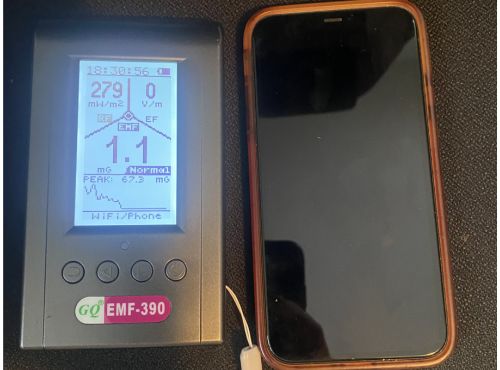
If you’ve already looked into EMF meters, you’ve probably come across the GQ EMF-390. It shows up in a lot of conversations, and for good reason. It measures all three types of EMF, it logs data over time, and it gives you a visual picture of RF activity that most meters in this price range simply don’t offer.
I’ve been using my GQ-390 EMF meter for a while now and I want to give you an honest picture of what this meter actually does well, where it has limits, and who it makes the most sense for.
Affiliate disclosure: I bought this meter myself. If you purchase through my link I may earn a small commission at no extra cost to you.
What the GQ EMF-390 Measures
The 390 covers all three EMF field types in one device. Magnetic fields (EMF) are measured in milligauss (mG) and come from appliances, wiring, and anything running on AC power. Electric fields (EF) are measured in volts per meter (V/m) and radiate from wiring inside walls, extension cords, and plug-in devices even when they’re not actively in use. RF power density is measured in mW/m² and covers wireless signals from routers, phones, smart meters, Bluetooth devices, and cell towers.
One thing worth knowing upfront: the 390’s magnetic and electric field measurements are functional, but RF is where this meter genuinely shines. If your primary interest is measuring wireless radiation from routers, phones, and other wireless devices, the 390 is built for that job.
What I Measured
I want to show you what this meter actually does in a normal home, so here are the readings I took at a few common sources.
Stove
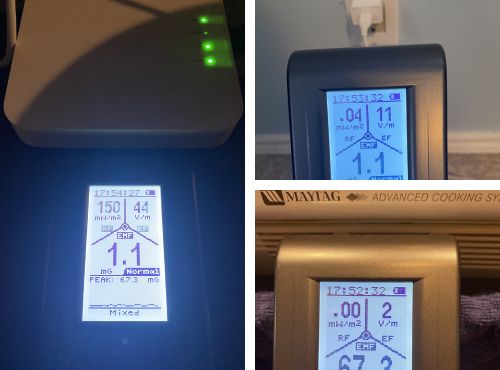
Right next to the stove, practically touching it, I measured 67.3 mG and 2 V/m. About a foot back that dropped to 5.3 mG and 1 V/m. At two feet back I was down to 2.1 mG and 1 V/m. That’s a pattern you’ll see with almost every large appliance: the field drops off quickly with distance. Two feet cut the magnetic field reading by about 97% compared to right at the surface.

Phone charger
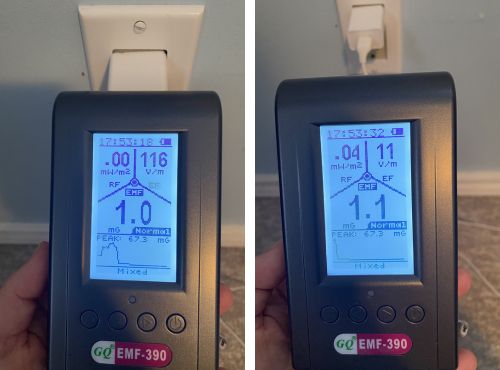
Right next to the charger I measured 116 V/m. About a foot away that fell to 11 V/m. Phone chargers are one of the more surprising sources of electric field in a typical bedroom, especially if yours sits on the nightstand while you sleep.
WiFi router
This is where the 390 showed me something I didn’t expect. I measured 68 mW/m² right next to the router, then took another reading at the same spot less than a minute later and got 150 mW/m². Same position, same router, big difference. That’s not the meter being inconsistent. That’s the router itself pulsing, and the 390 is catching it in real time.
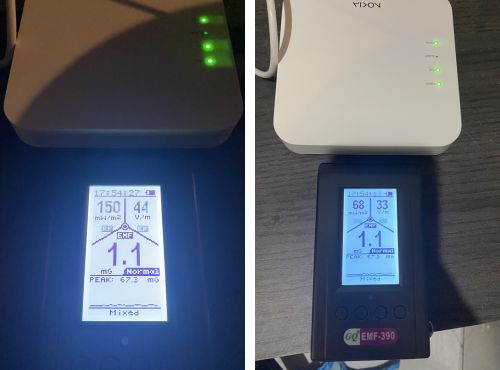
Outside the room about eight feet away, the reading dropped to 0.0 mW/m². The RF essentially disappeared as soon as I left the room.
Phone
I ran a quick test with my phone to show how much the 390 can tell you about what your devices are actually doing. With cellular on I measured 675 mW/m².Switching to airplane mode with WiFi still on brought it down to 406 mW/m². True airplane mode with everything off dropped it to 0.00 mW/m². That sequence tells you something useful: airplane mode with WiFi enabled is not the same as full airplane mode, and the difference on the meter is significant.

The RF Browser
One of the features that sets the 390 apart is the RF Browser. Instead of just showing you a single RF number, it displays a live visual of signal activity across frequencies so you can see what’s present in the environment, not just how strong the overall field is.
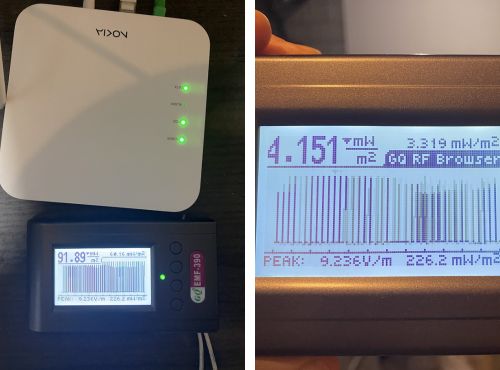
Right next to my router the RF Browser showed 91.89 mW/m² live with a peak of 226.2 mW/m². Outside the room at about eight feet back the live reading dropped to 4.151 mW/m² while the peak held at 226.2 mW/m², which is the highest reading captured during the session rather than the current live level. That distinction between live and peak is worth paying attention to when you’re using this feature.
Data Logging: The Feature That Changes How You Think About EMF
Most meters give you a snapshot. You hold it up, you read the number, you move on. The GQ EMF-390 does something different: it records readings continuously over time and lets you download that data to your computer as a CSV file.
I ran a 27-minute logging session and the results were more interesting than I expected. For the first twelve minutes I was near my router. The RF readings were all over the place, peaking at 310 mW/m² and averaging around 67 mW/m² during that period. Then I left the room. The moment I walked out, RF dropped to essentially zero and stayed there for the remaining fifteen minutes of the session, averaging 0.114 mW/m².
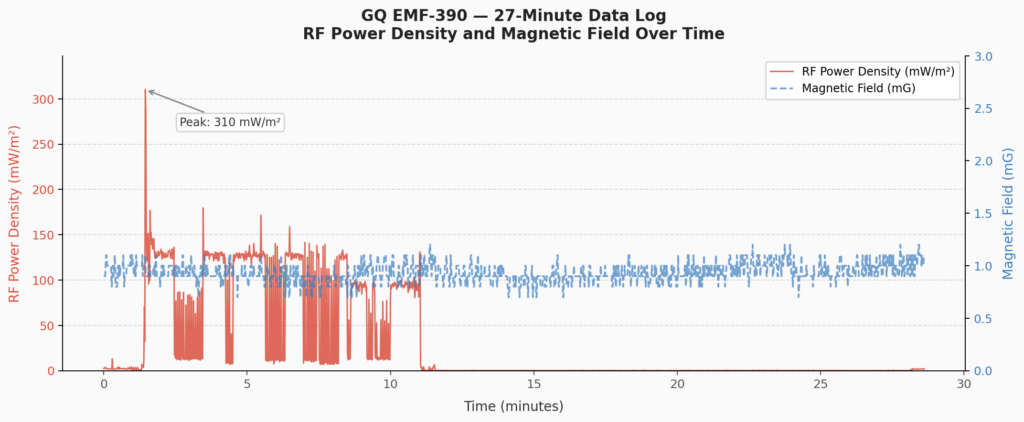
What the graph shows you that a single reading never could: RF isn’t a fixed number. It varies constantly depending on where you are, what your devices are doing, and what’s happening on your network. A spot reading near your router might be 68 mW/m² one moment and 150 mW/m² the next. The logged data captures all of that variation and lets you see patterns you’d otherwise miss entirely.
The magnetic field reading stayed flat at around 0.9 mG for the entire 27 minutes regardless of where I was in the house, which is a useful baseline to have as well.
One honest note on setup: getting the logging software running on a Mac takes a few extra steps and isn’t as plug-and-play as the meter itself. You’ll need to download the CH341 USB driver and the GQ EMF Pro software separately from GQ’s download page. On newer Macs you may also need to approve the driver in System Settings under Privacy and Security before it will work. It’s not difficult once you know what you’re looking for, but it isn’t obvious out of the box.
The RF Spectrum Display
Alongside the RF Browser, the 390 also has an RF Spectrum display that shows signal activity broken down across the frequency range the meter covers. Where the RF Browser gives you a live power reading with peak tracking, the Spectrum display gives you a visual sweep of which frequencies are active. If you’re trying to identify what’s contributing to a reading in a space with multiple wireless sources, this is a genuinely useful tool. It’s the kind of feature you’d expect on a more expensive professional instrument.
Live Graph Mode
The 390 also displays a live scrolling graph of your readings on screen as you move through a space. It’s a nice visual and gives you a real-time picture of how readings change as you move closer to or further from a source. I’d call it a useful at-a-glance tool rather than an essential feature, but it adds to the sense that this meter is designed to give you more context, not just a number.
Pros and Cons
The GQ-390 rewards patience. The more time you spend with it, the more useful it becomes, and the data logging feature in particular changes how you think about EMF measurement once you’ve actually used it.
Pros
- Measures magnetic fields, electric fields, and RF in one device
- Data logging with CSV export gives you a complete picture of exposure over time
- RF Browser and Spectrum display show frequency activity visually, not just a single power reading
- Captures real-time RF variability that spot readings miss entirely
- Covers RF frequencies up to 10 GHz, which includes 5G frequency ranges
- Live graph display adds useful visual context
- Priced competitively for what it offers
Cons
- Magnetic and electric field measurement is functional but not the meter’s primary strength
- RF is single-axis, meaning you need to rotate the meter to find peak readings
- Data logging software for Mac requires a separate driver download and isn’t plug-and-play
- The display and menu system have a learning curve compared to simpler meters
Who This Meter Is Right For
The GQ EMF-390 makes the most sense if you want to go beyond basic spot readings. If you’re the kind of person who wants to log readings overnight, map how RF levels change throughout your day, or see a visual breakdown of what frequencies are active in a space, this meter gives you tools to do all of that at a price point that doesn’t require a professional budget.

It’s also a strong choice if RF is your primary concern. The router, phone, and RF Browser readings I shared above give you a sense of what it can do. For someone focused on wireless radiation from everyday devices, the 390 delivers real data rather than just a number on a screen.
If you’re newer to EMF testing and want something straightforward to pick up and use without a learning curve, a simpler meter may be a better starting point. But if you’re ready to dig into the data, the 390 is worth it.
Check the current price on Amazon
What the Numbers Mean in Context
The readings I shared above are real and they come from a normal home. Some of them look high at first glance, especially the router and phone readings. Context matters here.
The ICNIRP regulatory limits for RF exposure sit far above anything a consumer meter will show you in a typical home environment. But regulatory limits were designed around short-term, high-intensity thermal effects, and they haven’t been substantially updated to reflect decades of research into long-term, low-level exposure. A separate set of guidelines from the International Institute for Building Biology and Ecology takes a more precautionary approach, with a general caution threshold of 100 µW/m² for RF in sleeping areas and 10 µW/m² for people who are more sensitive.
The NTP study and the Ramazzini Institute findings both found associations between RF exposure and biological effects at levels below current regulatory limits. The research is still developing, but there’s enough there that simple, proportionate steps make sense. Measuring first is the right place to start, and that’s exactly what a meter like this lets you do.
If you want to understand what your readings actually mean and how they compare to established benchmarks, I go through all of that in detail in what’s a normal reading on an EMF meter.
Not a doctor. Nothing here is medical advice. If you have specific health concerns, talk to a qualified professional.